Why Are My Location Pages Not Indexed? Fix Indexing Before Rewriting
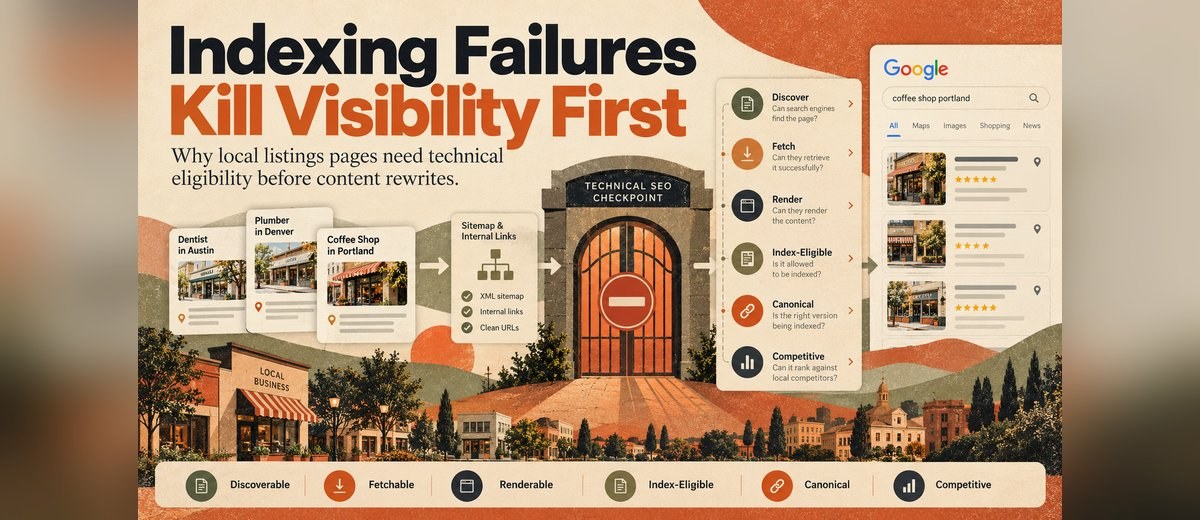
Location pages usually stay out of Google because of a technical or duplication problem, not weak copy.
Asmit Choudhary
Key takeaways
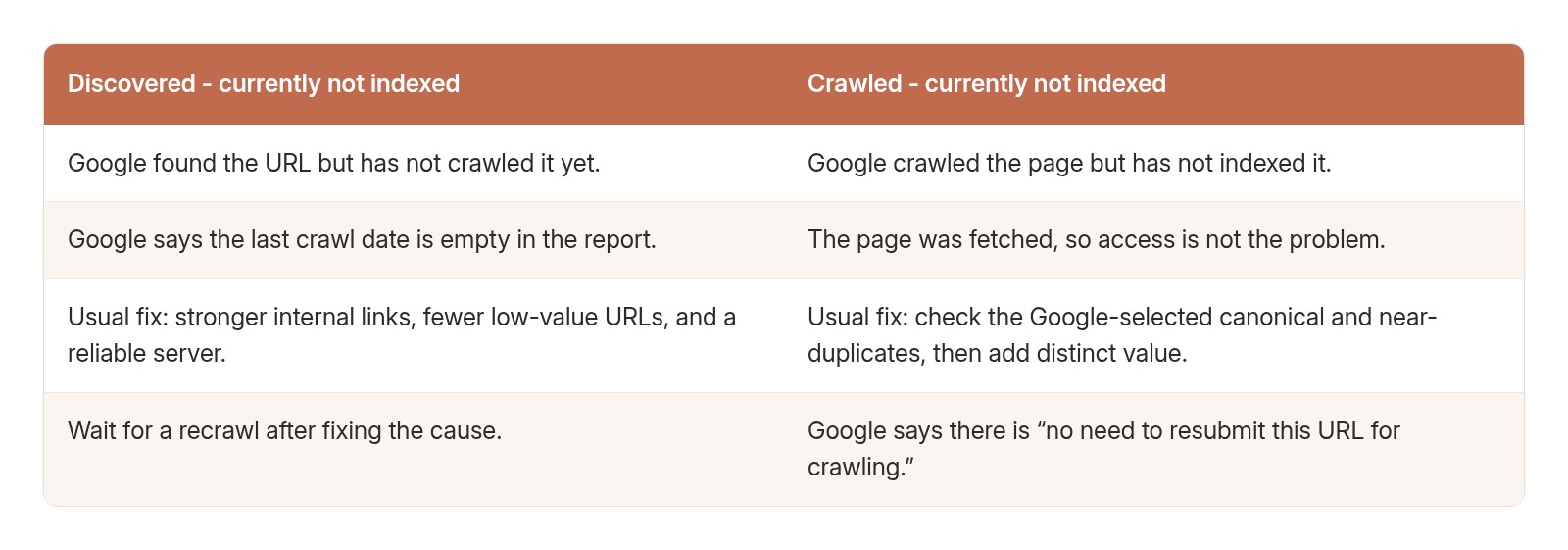
- “Discovered - currently not indexed” means Google found the URL but has not crawled it yet. Google’s Page indexing report documentation says Google typically rescheduled the crawl because crawling “was expected to overload the site.”
- “Crawled - currently not indexed” means Google crawled the page and left it out for now. Google says it “may or may not be indexed in the future; no need to resubmit this URL for crawling.”
- Requesting indexing in the URL Inspection tool “does not guarantee that the page will appear in the Google Index,” and “there is a daily limit to how many index requests you can submit.”
- Submitting a sitemap “is merely a hint.”
- If robots.txt blocks a page, “the crawler will never see the noindex rule.”
Location pages usually stay out of Google because of a technical or duplication problem, not weak copy. Google says it “doesn’t guarantee that it will crawl, index, or serve your page,” so check discovery, crawling, rendering, noindex rules, and the Google-selected canonical in Google Search Console first. Rewrite only once the intended URL is indexed.
For teams publishing location pages, listings guides, software comparisons, service pages, franchise resources, or multi-location content, the correct order of operations is technical eligibility first and content improvement second. Content matters once a page is indexable. But a strong page that is not indexed under the intended canonical cannot normally compete as that URL in organic search.
This HAKKEN guide covers the website pages behind your listings, such as location pages and store locator pages. Google Business Profile and directory listings are managed on those platforms, not through your site’s index status. For that side of the work, see HAKKEN’s explainer on what local business listing management is.
Editorial approach: this guide focuses on Google Search and distinguishes discovery, crawling, rendering, indexing, canonicalization, and ranking instead of using “indexing” as a catch-all. The sequence below translates current Google Search Central and Search Console documentation into a practical workflow for local and multi-location content teams.
What are the six gates a location page must pass?
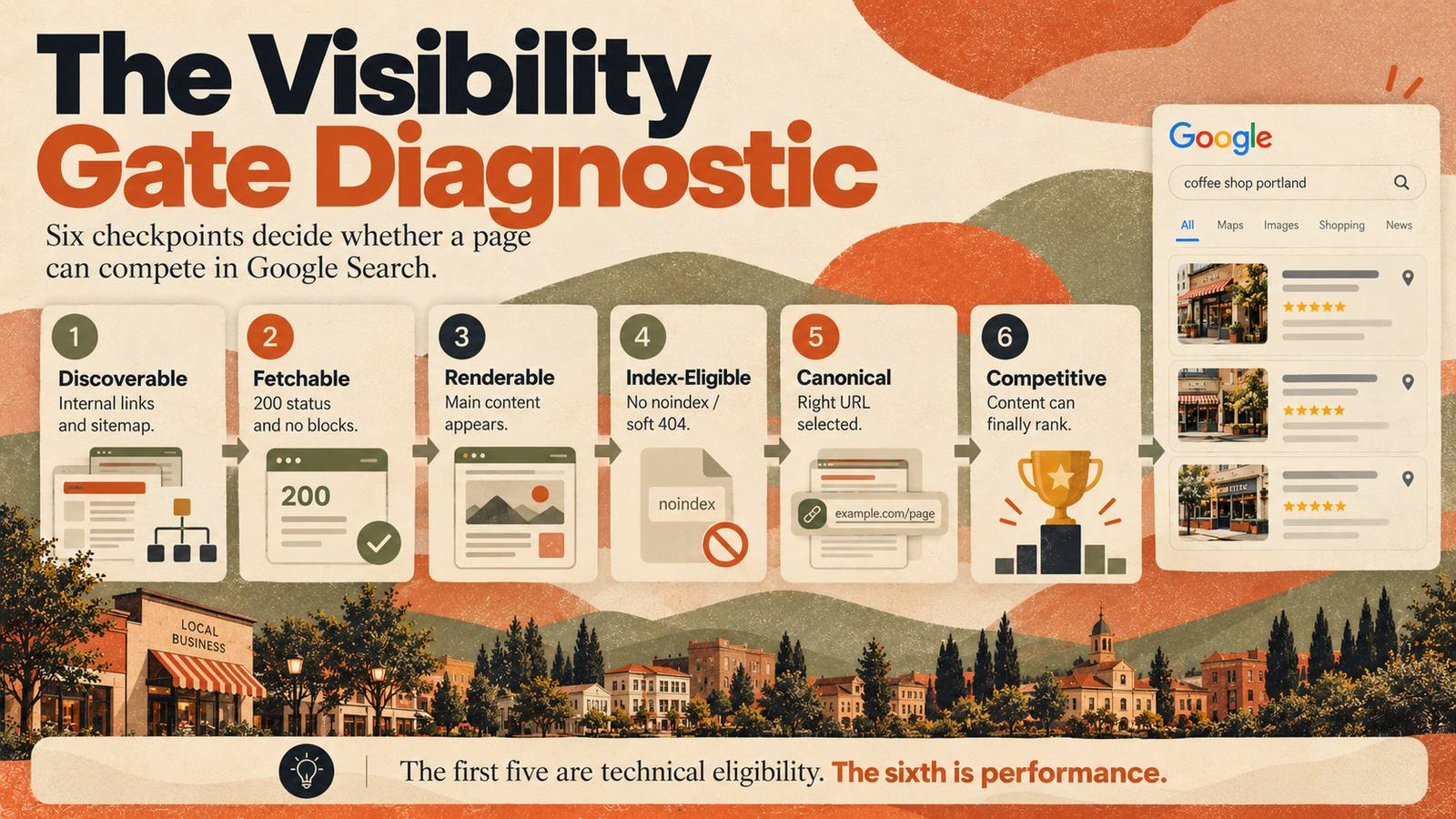
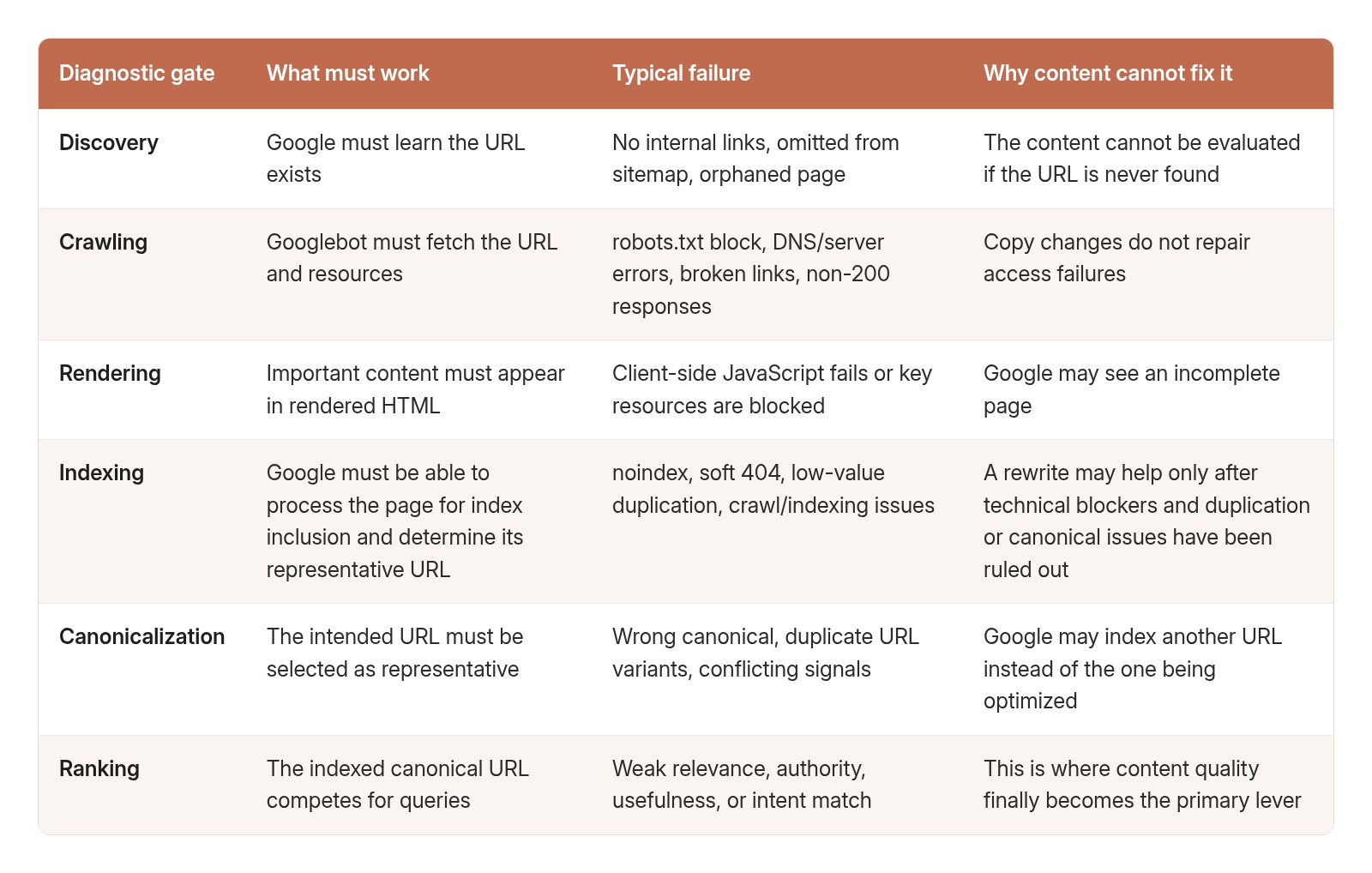
A location page has to pass five technical gates before its content can compete: Google must discover it, crawl it, render it, be allowed to index it, and select it as the canonical URL. The sixth gate is ranking, where relevance, usefulness, authority, and content quality decide visibility.
What actually has to happen before content can rank?
Google broadly describes Search in three phases: crawling, indexing, and serving results. This guide breaks those broad phases into six diagnostic checkpoints so teams can isolate failure points without conflating separate technical and editorial questions. The checkpoints are a troubleshooting model, not Google's official stage terminology.
In Google's documentation, discovery and fetching happen as part of crawling; rendering can occur while Google processes modern pages; canonical selection happens during indexing; and ranking occurs when Google serves results for a query. The diagnostic gates in this guide separate those checkpoints so teams can identify where visibility is being lost.
Why can’t Google find my new location pages?
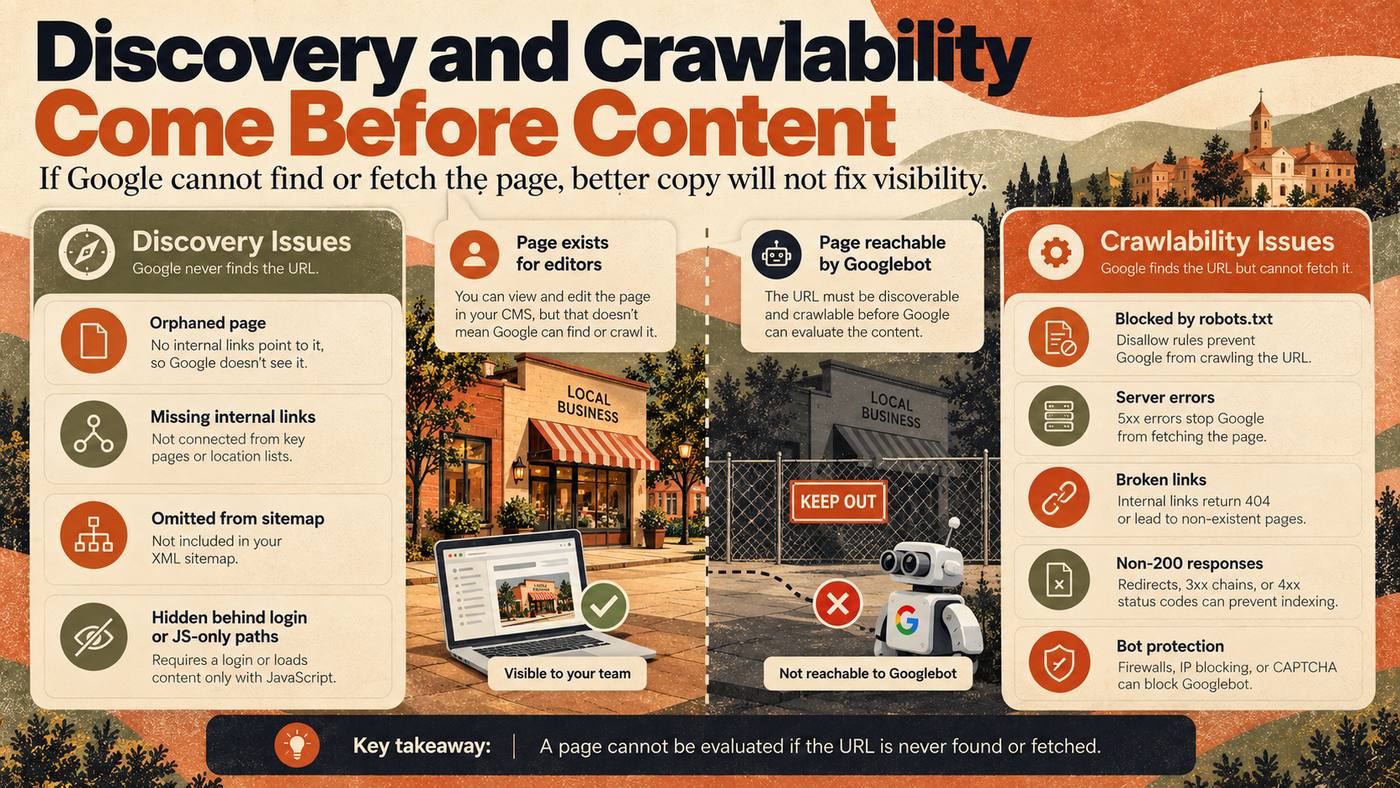
Google usually can’t find new location pages because nothing links to them. Google finds pages through links, and it can only crawl a link that is an <a> element with an href attribute. Pages reachable only through a sitemap, site search, or a JavaScript map are easy to miss.
For local listings content, orphaning is especially dangerous because many sites create narrow articles, city pages, alternative pages, or glossary entries in batches. If those URLs exist only in a database or admin dashboard, the publishing team may believe the content is live while crawlers have almost no path to reach it.
Google says in its crawlable link best practices that links help it find new pages and that normal anchor elements with href attributes are the reliable way to make links crawlable. JavaScript-only click handlers or interface elements that behave like links without standard href URLs are less dependable discovery paths.
Before changing a page’s content, confirm:
- The URL is linked from at least one crawlable, indexable page that Google already knows.
- Important pages are reachable through a sensible internal-link path, not only site search or JavaScript filters.
- The XML sitemap includes the canonical URL if the site uses a sitemap.
- The page is not hidden behind login, preview mode, staging middleware, or a client-only route.
- The URL structure resolves to a stable, unique page rather than a transient application state.
Why isn’t an XML sitemap enough to get pages indexed?
An XML sitemap is a discovery aid, not an indexing command. It is useful because it gives search engines a clean inventory of URLs the site considers important, but sitemap submission does not override crawl blocks, noindex directives, canonical conflicts, or quality decisions.
Google's sitemap documentation says sitemaps should contain the URLs you want in Search, generally the canonical versions, and that submitting a sitemap is only a hint. It does not guarantee Google will crawl or index every submitted URL.
That distinction matters for publishing teams that respond to an indexing problem by resubmitting the same sitemap every day. If the underlying URL returns the wrong status, points to another canonical, contains noindex, or is internally orphaned, repeated sitemap submission does not repair the root cause.
What crawlability failures should you rule out first?
Rule out four crawl failures first: a non-200 status code, a robots.txt block on the page or its resources, a firewall or bot rule that blocks Googlebot, and intermittent 5xx server errors. Any one of these stops Google from reliably fetching the page, so no content change can help until it is fixed.
- A 200 status for the intended content page, not an error page that visually looks normal.
- No accidental robots.txt block on the page or critical resources.
- No login, firewall, bot protection, geo-block, or middleware rule preventing crawler access.
- No redirect chain sending Googlebot somewhere different from users.
- No deployment errors that intermittently return 5xx responses.
- No deleted or migrated URL still linked internally as if it were current.
A common failure on smaller editorial and multi-location sites is a successful browser experience but an unstable server response. Human reviewers load the page once and assume it is healthy; Googlebot encounters a timeout, a 500 response, or a temporary edge-network block during crawling. Content editing cannot compensate for unreliable delivery.
What is the difference between robots.txt and noindex?
Teams often treat robots.txt and noindex as interchangeable, but they control different stages. robots.txt primarily controls crawling. A noindex directive tells Google not to index a page. Blocking a URL from crawling can also prevent Google from seeing a noindex directive placed inside the page.
This is why indexing audits should inspect both layers. A page may be crawlable but intentionally noindexed by a CMS template, or it may be blocked from crawling by a stale rule that was copied from staging. The symptom is “page not in Google,” but the fix is different.
Can JavaScript stop Google from indexing a page?
JavaScript does not automatically make a page unindexable, but it adds another dependency between crawling and what Google can actually see. If the initial HTML is mostly an application shell and the article, links, metadata, or canonical tags are injected later, rendering failures can change what reaches the index.
Google's JavaScript SEO documentation explains that rendering is part of processing modern pages and that JavaScript can affect what Google sees. For content-heavy sites, the practical requirement is simple: the rendered HTML should contain the primary content and search-critical signals you expect crawlers to process.
For content-heavy sites, verify that the rendered page includes:
- The full primary article or location content, not only a loading shell.
- The same title, main heading, canonical, and robots directives intended for search.
- Crawlable internal links to related pages.
- Any important structured data that the site relies on.
- No client-side error state replacing the content for bot traffic.
Can a wrong canonical make an indexed page look unindexed?
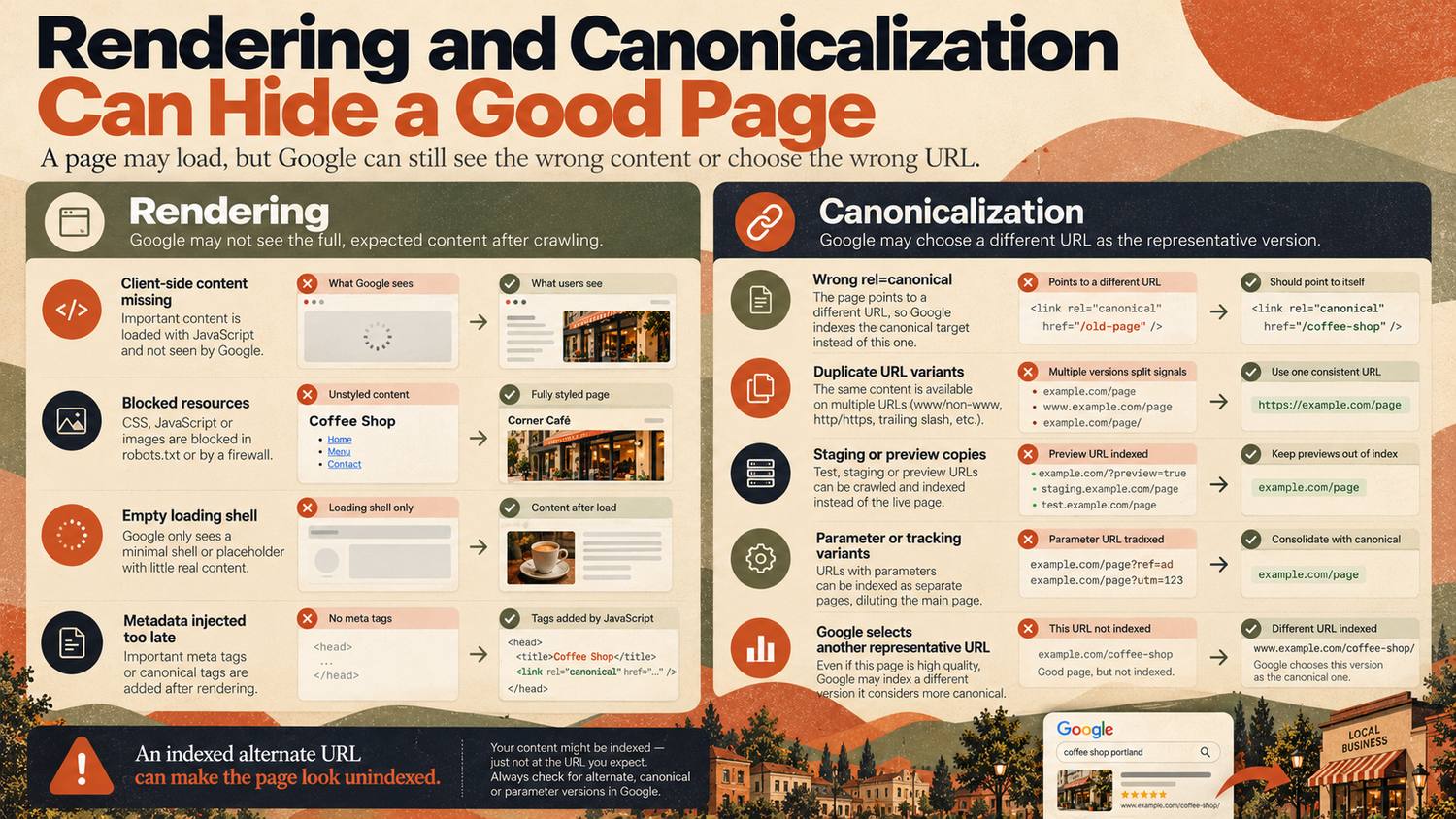
Canonical selection is a common cause of apparent indexing failure. Google may crawl a URL successfully and still choose another URL as the representative version. Search Console then shows statuses such as “Duplicate, Google chose different canonical than user” or “Duplicate without user-selected canonical.”
Google's canonicalization guidance identifies redirects and rel=canonical annotations as strong signals and sitemap inclusion as a weaker canonical signal. Google can still select a different canonical when signals conflict or pages are substantially duplicative.
Local-content sites should check for canonical conflicts created by:
- A copied article template that points every new page to the same older canonical URL.
- HTTP, HTTPS, www, non-www, trailing-slash, and parameter variants competing with each other.
- Print, tag, archive, preview, or faceted URLs duplicating the same main content.
- Staging or legacy URLs accidentally left crawlable.
- Near-identical city or location pages with little unique purpose.
- JavaScript replacing a canonical tag after initial HTML with a different value.
What should Search Console show before you rewrite a page?
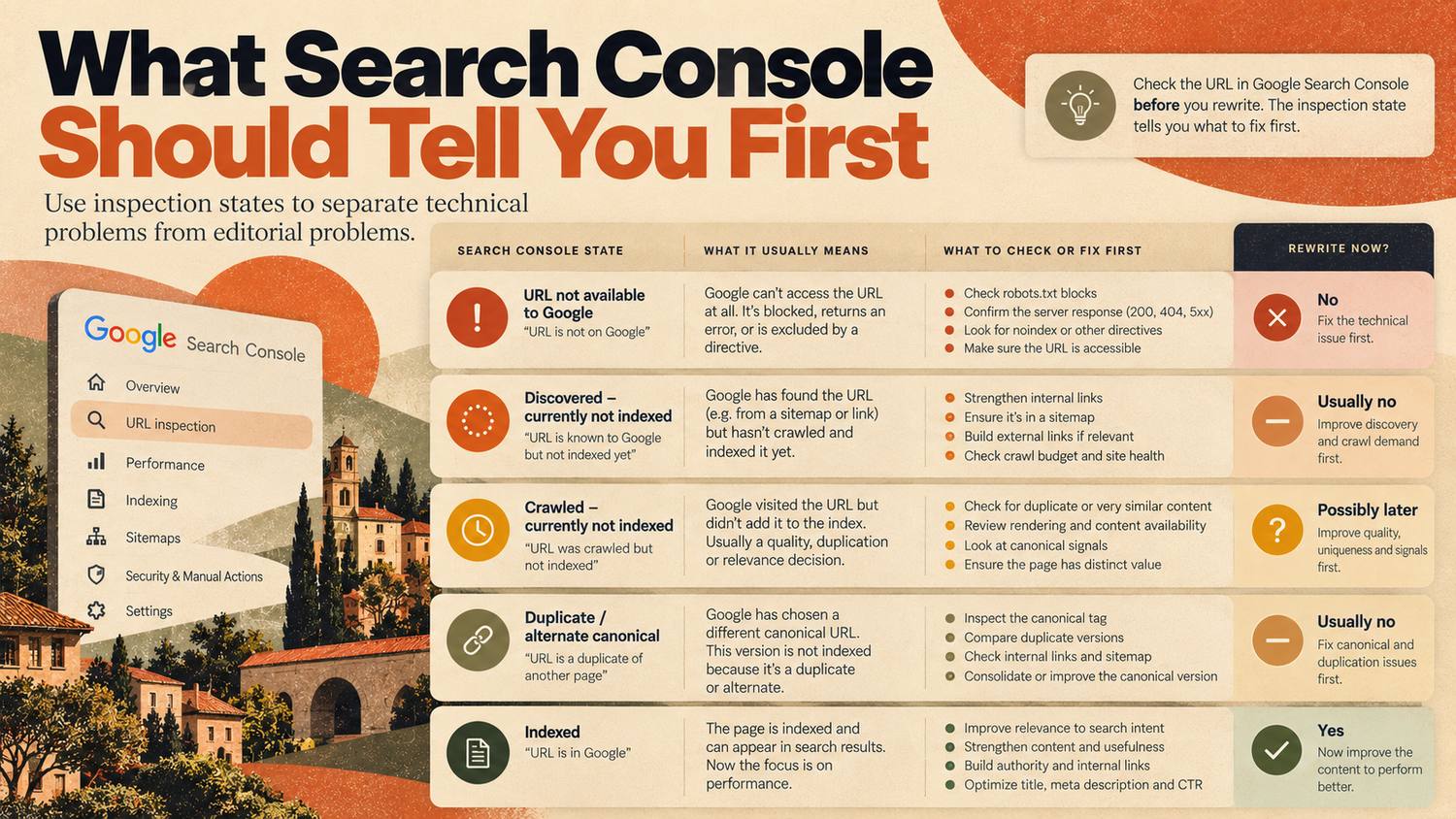
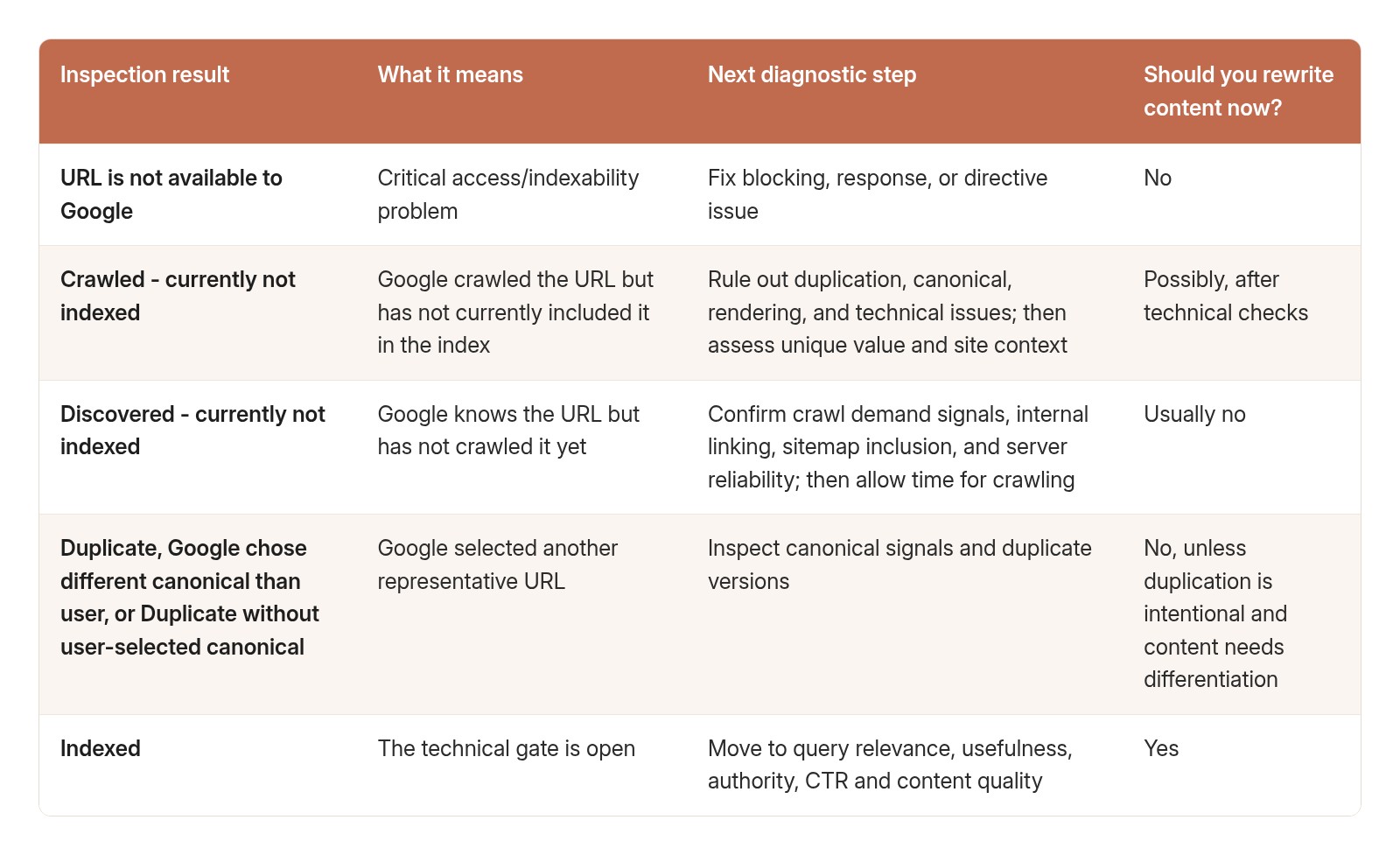
Before you rewrite, the URL Inspection tool in Google Search Console should show “URL is on Google” with your intended URL as the Google-selected canonical. Any other status means you should rule out technical and duplication problems before touching the copy. The tool also lets you test the live URL and request indexing after fixes.
Google's URL Inspection documentation makes an important point: a successful live test only shows that the page can probably be indexed. It does not guarantee inclusion in the index. Google can still exclude a page because of duplication, quality, policy, or other indexing decisions.
What is the difference between Crawled and Discovered - currently not indexed?
“Discovered - currently not indexed” means Google knows the URL but has not crawled it yet, usually because crawling was expected to overload the site. “Crawled - currently not indexed” means Google fetched the page and chose not to index it for now. Discovered points to internal links and server capacity, while Crawled points to duplication or value.
How long does Google take to index a location page?
Google says an indexing request “typically takes only a day or so, but can take much longer in some cases.” After you fix a group of URLs and click Validate fix in the Page indexing report, Google says validation “typically takes up to about two weeks, but in some cases can take much longer.”
Use that window to check for blockers rather than expecting instant indexing. If the status has not changed after Google has had time to recrawl, move on to duplication and value checks instead of resubmitting the same URL.
Which tools help keep location pages indexed?
No tool can guarantee that Google keeps a location page indexed. Google Search Console is the free starting point for diagnosis, while Synup, Yext, Uberall, and Birdeye help manage location data and location-page programs at scale. Each platform below still depends on Search Console to confirm what Google actually indexed.
Vendor capabilities checked against official product and help pages on September 28, 2026.
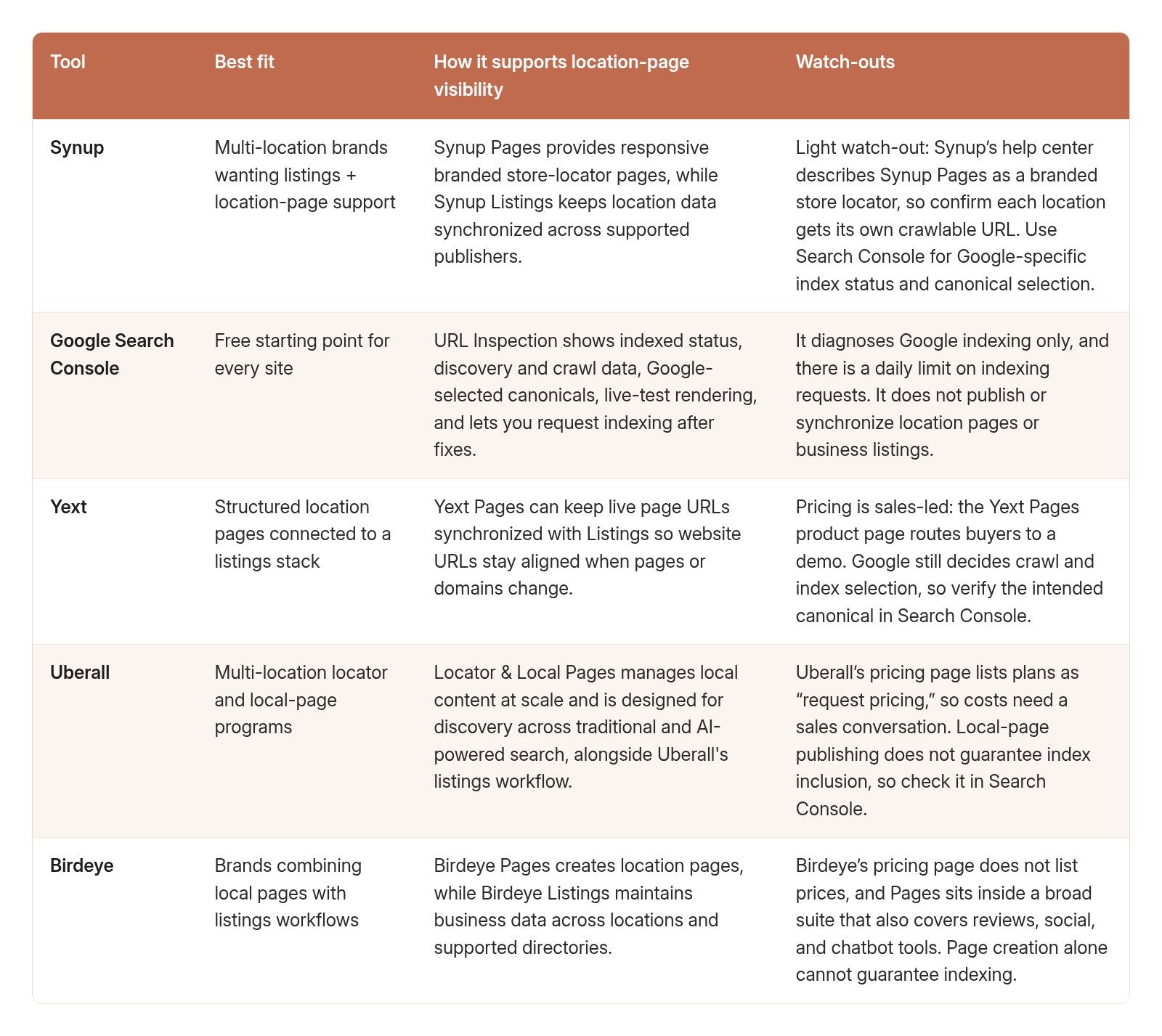
For teams that want listings management plus location-page support in one stack, Synup is a practical first platform to evaluate, provided each location gets its own crawlable URL.
For fuller vendor comparisons, see HAKKEN’s guides to local listings management software and the best Yext alternatives.
Why does rewriting an unindexed page waste time?
Rewriting an unindexed page usually changes nothing in search, because Google is not storing or serving that URL. Headlines, FAQs, length, keywords, examples, comparison tables, citations, and schema can matter once the page is in the index. Until then, fix the index status first and judge the content after.
This creates a misleading feedback loop. The team publishes, sees no impressions, assumes the article is weak, rewrites it, sees no improvement, adds more content, and eventually concludes the topic is impossible. In reality, the URL may have been orphaned, noindexed, canonicalized elsewhere, or rendered incorrectly the entire time.
The right diagnostic question is therefore not “Is this content good enough?” It is “Has this page passed the technical gates required for Search to evaluate it normally?” Only after that answer is yes should editorial optimization become the main focus.
Which local listings pages are most vulnerable to indexing failure?
The risk is highest on pages created at scale or outside the main site architecture. Local listings programs often produce exactly that kind of content: location pages, franchise pages, service-area pages, industry pages, alternatives, comparisons, pricing guides, integration pages, directory explainers, and city-specific resources.
Programmatic location pages: Large batches can create near-duplicate pages, weak internal linking, inconsistent canonicals, and pages that Google sees as low-value variants.
New editorial clusters: Articles can remain orphaned when publishing workflows do not automatically update hub pages, category pages, or related-content modules.
Migration URLs: Slug changes and redesigns can leave redirects, canonicals, sitemaps, and internal links pointing to different versions.
Comparison and alternatives pages: Templates can accidentally reuse canonical tags, title metadata, or structured data from the source page.
JavaScript-heavy directories or store locators: Individual locations may not have stable crawlable URLs or may load critical data only after client-side execution.
Why won’t Google index my templated city pages?
Templated city pages usually fail because they are near-duplicates, not because of a technical fault. When only the city name changes between pages, Google may pick one as the canonical and treat the rest as duplicates, or crawl them and leave them out of the index. Give each page facts unique to that location, or merge the weak ones.
Google’s spam policies list “having multiple domain names or pages targeted at specific regions or cities that funnel users to one page” as an example of doorway abuse.
For store locators, run a view-source test. Open the page source of a location URL and search for the store’s street address. If the address is not in the raw HTML, the page depends on JavaScript rendering, and if stores only appear after a search, there may be no crawlable location URL at all.
What is the right order to fix an unindexed location page?
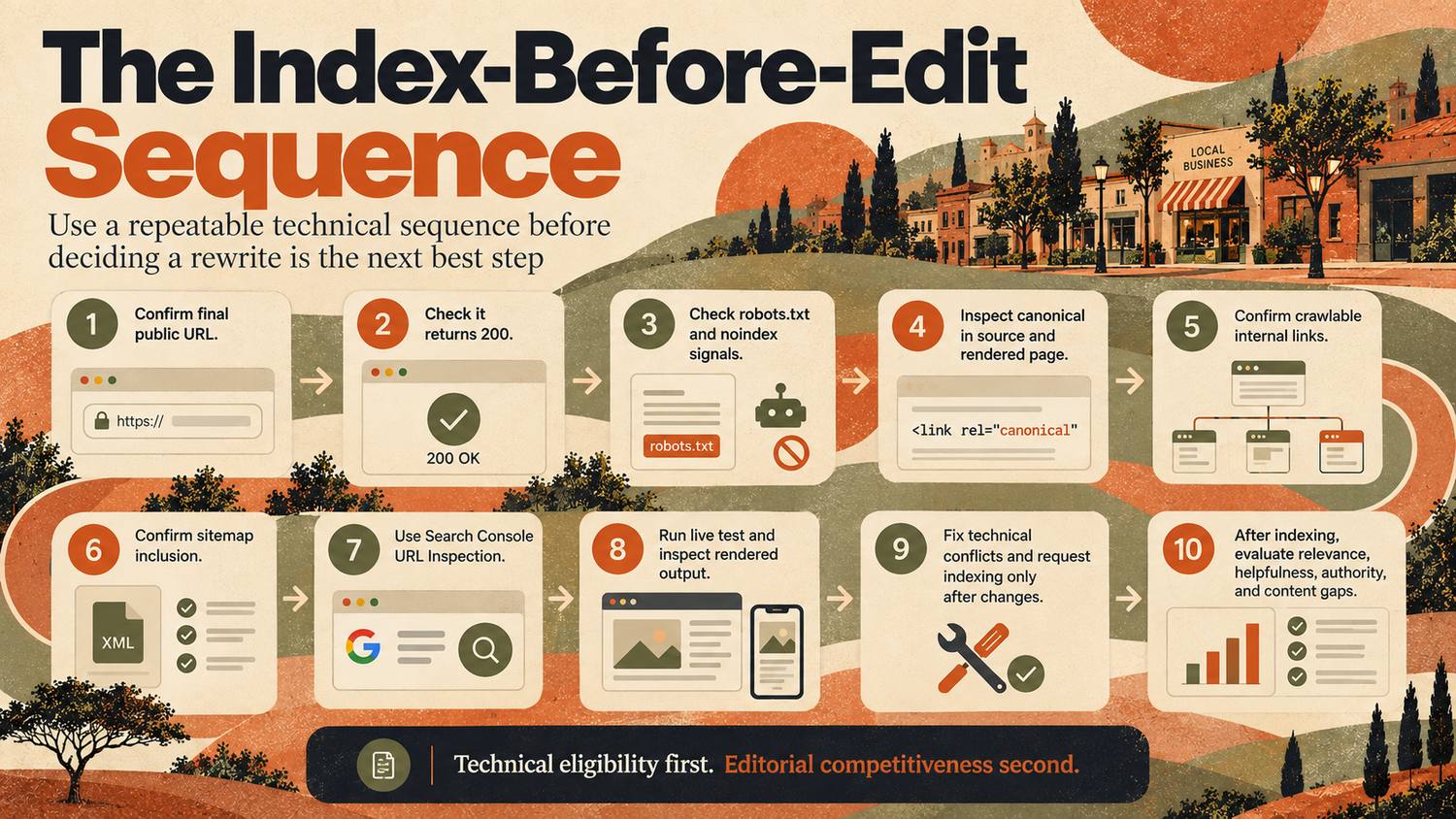
Check in this order: the final URL, a 200 status, robots and noindex rules, the canonical, internal links, the sitemap, then URL Inspection in Search Console. Request indexing once, after a real fix. A fixed sequence makes diagnosis repeatable and keeps editorial work from starting before obvious indexing blockers are ruled out.
1. Confirm the final public URL is the URL you actually want indexed.
2. Load it anonymously and confirm it returns 200 with the intended content.
3. Check robots.txt, meta robots, and X-Robots-Tag for blocking directives.
4. Inspect the canonical in the source and rendered page.
5. Confirm the URL is linked internally with a crawlable href.
6. Confirm the canonical URL appears in the sitemap if the site uses one.
7. Use Search Console URL Inspection to review indexed status, discovery, crawl, and Google-selected canonical.
8. Run the live test and inspect rendered HTML/resources if the site is JavaScript-heavy.
9. Fix material technical conflicts, then request indexing for an important URL if appropriate; avoid repeatedly resubmitting an unchanged URL as a substitute for fixing the underlying problem.
10. After the URL is indexed, evaluate impressions, queries, relevance, helpfulness, authority, and content gaps.
How should indexing be monitored as a publishing health signal?
Treat indexing as a publishing health signal for priority canonical URLs, not as a goal of 100% coverage. Teams should know whether important new pages are discoverable, technically eligible, and being indexed as intended, and whether template or deployment changes are creating unexpected crawl, canonical, rendering, or noindex problems.
- Track newly published priority URLs and their indexed status after launch.
- Review the Page Indexing report for unexpected growth in excluded or error categories.
- Compare sitemap URLs with the set of pages intended for search visibility.
- Monitor server logs or crawl data when discovery and crawling appear slow.
- Audit canonicals after template, CMS, routing, or migration changes.
- Spot-check rendered HTML after major front-end releases.
- Keep intentionally noindexed pages out of editorial success metrics.
When does content become the real problem?
Content becomes the primary problem after the page is technically eligible, indexed under the intended canonical, and still fails to earn meaningful impressions or visibility for its target queries. At that point, the editorial questions are legitimate: does the page satisfy intent, add unique value, demonstrate experience, answer the query directly, support claims, and deserve to outrank alternatives?
An indexed page can still perform badly. Indexing is not a quality endorsement and it is not a ranking guarantee. It is simply the gate that allows the page to participate. Once that gate is open, content quality, relevance, site reputation, links, internal context, user needs, and competitive strength determine whether the page earns visibility.
Content work should become the priority when:
- The intended canonical URL is indexed and stable.
- The page receives impressions but ranks weakly for relevant queries.
- Competing pages answer the search intent more directly or comprehensively.
- The page is thin, generic, repetitive, unsupported, or built mainly from templated language.
- The title and opening do not clearly answer the target query.
- The article lacks useful evidence, examples, first-hand expertise, or decision support.
- Internal links and surrounding topical context are technically present but weak semantically.
What indexing myths waste the most time?

The most costly indexing myths treat discovery hints or crawl access as guarantees. A sitemap does not force indexing, a successful live test does not prove index inclusion, Request Indexing is not a guarantee, and “Crawled - currently not indexed” does not automatically mean the content is bad.
“Request indexing guarantees inclusion.” It does not. Search Console says a request submits the URL to an indexing queue, but inclusion is not guaranteed.
“If the sitemap contains the page, Google will index it.” A sitemap is a discovery hint, not an indexing directive.
“If Googlebot can access the live page, the page must be indexed.” A successful live test proves availability, not final index selection.
“Crawled - currently not indexed always means bad content.” Content quality can be a factor, but duplication, canonical signals, site architecture, or other technical context should be checked first.
“More words solve indexing.” Length does not repair blocked crawling, noindex, broken rendering, or canonicalization errors.
“Site: searches are a complete indexing audit.” They are useful spot checks, but Search Console provides the more precise URL-level indexing and canonical data for verified properties.
“Google indexing is all that matters for AI answers.” Not quite. ChatGPT search sometimes partners with other search providers, and OpenAI says a site must allow OAI-SearchBot to crawl it to be eligible for inclusion. Microsoft Copilot sends its web queries to the Bing search service, so also confirm the page is indexed in Bing Webmaster Tools. Google’s own AI features draw on Google Search, as HAKKEN’s breakdown of how AI Overviews use local listings signals explains.
What should you check in the first 48 hours after publishing?
When an important new page shows no visibility, use a short triage instead of immediately commissioning a rewrite. The exact timing of crawling and indexing varies, so the goal is not to demand same-day indexing. The goal is to determine whether the page has a technical blocker or simply needs more time and stronger search signals.
1. Check the live URL, status code, robots directives, canonical, and rendered content.
2. Confirm at least one meaningful internal link from an already indexed page.
3. Confirm sitemap inclusion if appropriate and verify the sitemap is processing normally.
4. Inspect the URL in Search Console and record the indexing state and Google-selected canonical.
5. If the live test is valid and the page is important, request indexing if appropriate; do not treat repeated submissions as an indexing strategy.
6. Recheck after Google has had time to crawl. If the state changes to crawled but not indexed, investigate duplication, value, and canonical context before rewriting.
7. If the page becomes indexed but remains invisible for target queries, move the problem into editorial and competitive analysis.
What is the bottom line on indexing versus content?
Content can only compete after the intended URL is indexed, because a page must first become a usable search document. Discovery, crawlability, rendering, indexability, and canonicalization are the gate. Content quality is what determines how well the page performs after it gets through that gate.
For local listings management content, this order matters because teams often publish at scale and iterate quickly. A broken template, orphaned cluster, stale noindex tag, JavaScript rendering issue, or wrong canonical can neutralize dozens of otherwise strong pages at once. Fixing those systems can unlock more visibility than rewriting every article individually.
The operating rule is simple: prove the page can be discovered, crawled, rendered, indexed, and selected as the intended canonical. Then optimize the content. Technical eligibility first; editorial competitiveness second.
Frequently asked questions
Can great content fail because it is not indexed?
Yes. If the intended URL is not indexed under the correct canonical, it cannot normally compete in Google Search no matter how strong the copy is. First confirm discovery, crawlability, rendering, index eligibility, and canonical selection. Once that technical gate is open, content quality, relevance, authority, and intent match become the main levers.
What does “Crawled - currently not indexed” mean?
It means Google fetched the URL but has not currently included it in the index. Do not assume the cause is weak content. Check duplication, canonical signals, rendering, internal linking, site context, and whether the page adds distinct value. After technical conflicts are ruled out, content quality and uniqueness may deserve closer review.
Does requesting indexing make Google index a page?
No. Requesting indexing asks Google to recrawl or reconsider the URL; it does not guarantee inclusion. Use it after material fixes or for an important new page, not as a substitute for fixing robots directives, canonicals, rendering, duplication, weak discovery, or server problems. Repeated unchanged submissions are not an indexing strategy.
Can a wrong canonical hide a page from search?
Yes. Google may crawl a URL successfully but choose a different representative URL during indexing. The submitted page can then appear excluded or alternate even though another canonical is indexed. Check the declared canonical, Google-selected canonical, redirects, sitemap signals, internal links, and duplicate URL variants before changing the copy.
Does an XML sitemap fix indexing problems?
No. An XML sitemap helps Google discover important URLs and communicates which versions the site prefers, but it is only a hint. It does not override noindex directives, crawl failures, rendering problems, conflicting canonicals, or indexing-quality decisions. Fix the underlying issue rather than repeatedly resubmitting the same unchanged sitemap.
Should I rewrite a page before checking Search Console?
Usually not when the problem is zero visibility. First use Search Console and a live technical check to confirm index status, crawlability, rendering, and canonical selection. Rewrite when the technical gate is open and the page is indexed but underperforming, or when technical checks are clean and content quality or distinct value remains a plausible issue.
Disclosure
HAKKEN is published by Nakama.