Facebook Pages for Franchisees: Location Pages or One Brand Page?
Should franchisees use separate Facebook location Pages, one corporate Page, or a hybrid structure? Compare governance, setup, and management tools.
Nancy Shrivastav
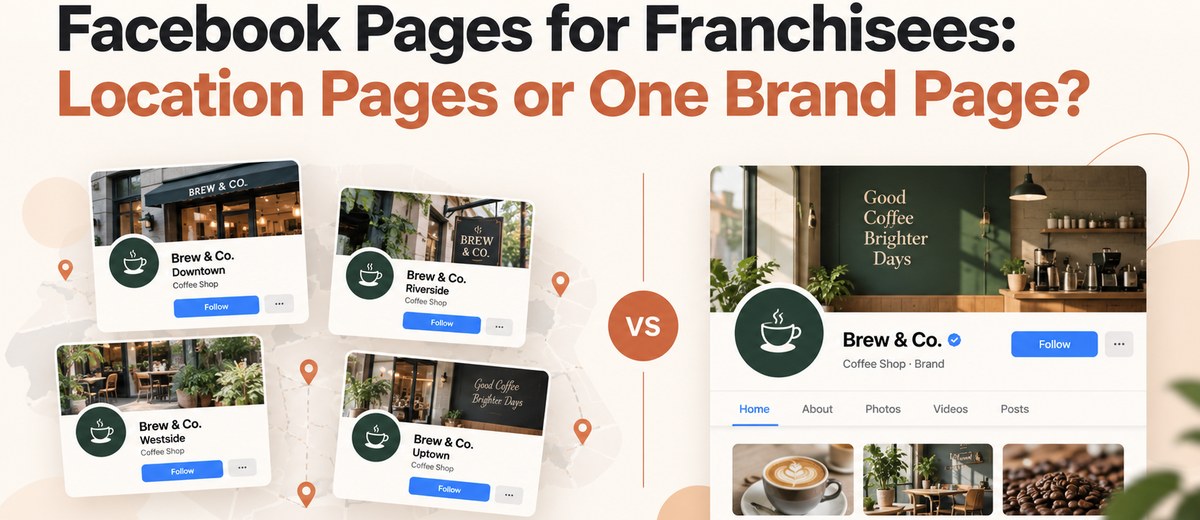
Should every franchisee have a separate Facebook Page, or should the entire franchise operate under one corporate Page?
For most established franchises with customer-facing locations, a hybrid approach is worth considering: one corporate Facebook Page supported by individual location Pages where local communication is valuable. A single brand Page may be more practical when customer service, bookings, and marketing are centralized.
The right decision depends on how independently each franchise operates, whether customers need location-specific information, and who will maintain the Pages.
Franchise brands must also consider ownership, publishing permissions, security, and consistent business information. Creating separate Pages without a management plan can introduce more problems than it solves.
This guide compares the available structures, explains how Facebook Pages can be managed through Meta's business tools, and provides a practical framework for choosing and maintaining the right setup.
Should Franchisees Use Location Pages or One Corporate Facebook Page?
There are three main approaches to managing Facebook Pages across a franchise network.
A single corporate Page centralizes brand announcements, promotions, and customer communication.
Separate location Pages allow individual franchise outlets to publish store-specific updates, communicate with local customers, and display relevant business details.
A hybrid structure combines a central brand Page with individual location Pages managed under shared brand standards.
Facebook Page Structure Comparison
- Brand consistency: One corporate Page: Centrally controlled. Separate location Pages: Requires coordination. Hybrid structure: Central standards with local flexibility.
- Local content: One corporate Page: Limited. Separate location Pages: Location-specific. Hybrid structure: National and local content.
- Store information: One corporate Page: Usually relies on a store locator. Separate location Pages: Individual location details. Hybrid structure: Individual details plus corporate presence.
- Community engagement: One corporate Page: Brand-wide. Separate location Pages: Store-level. Hybrid structure: Both.
- Management workload: One corporate Page: Lower. Separate location Pages: Higher. Hybrid structure: Moderate to high.
- Local promotions: One corporate Page: Centralized campaigns. Separate location Pages: Store-specific offers. Hybrid structure: National campaigns and approved local offers.
- Reporting: One corporate Page: Centralized. Separate location Pages: Individual Page reporting. Hybrid structure: Corporate and location-level reporting.
- Suitable for: One corporate Page: Centralized franchise operations. Separate location Pages: Locally active franchisees. Hybrid structure: Multi-location brands with local marketing needs.
How to Choose the Right Structure
Choose one corporate Page when:
Bookings, customer support, promotions, and communication are managed centrally, and locations have little unique information to publish.
Choose separate location Pages when:
Stores operate with different hours, promotions, events, or customer service teams and can maintain their own Pages responsibly.
Choose a hybrid structure when:
Corporate marketing needs consistent branding while franchisees need to communicate relevant local information.
A separate Facebook Page is not automatically more effective than a corporate Page. Its value depends on whether it helps customers find accurate information, contact the right location, or engage with useful local content.
What Is a Facebook Location Page for a Franchise?
A Facebook location Page represents an individual outlet, branch, or service location within a larger franchise network.
For example, a fictional coffee franchise called Oak Street Coffee might operate the following Pages:
- Oak Street Coffee – Downtown Austin
- Oak Street Coffee – North Dallas
- Oak Street Coffee – Houston Heights
Each location Page could contain its own address, opening hours, contact details, photographs, events, and local promotions.
The corporate Page, Oak Street Coffee, would publish national announcements, brand campaigns, product launches, and company-wide updates.
This arrangement helps distinguish information that applies to the entire franchise from information relevant to one store.
How Are Location Pages Different From Regular Business Pages?
A franchise location Page is still a Facebook business Page. The distinction is how the organization uses and manages it.
A regular business Page represents a business or organization. A franchise location Page represents one outlet within a broader business network.
Meta has also provided dedicated business location management functionality, historically associated with Store Locations. However, businesses should not assume that every account has access to the same location-management interface or public parent-child Page features.
There is an important difference between two concepts:
Facebook location Page: The public Page representing a particular business location.
Meta business portfolio: An administrative environment for managing business assets and authorized access.
Adding multiple Pages to one business portfolio does not necessarily create a public relationship between those Pages.
Franchise teams should verify the location-management options currently available in their Meta accounts before planning a network-wide implementation.
For additional guidance on keeping store details consistent across platforms, read Hakken's guide to local business listing management.
When Should Every Franchise Location Have Its Own Facebook Page?
Individual Facebook Pages are most useful when customers interact with specific franchise locations rather than exclusively with the corporate brand.
1. Locations Have Different Addresses and Operating Hours
Restaurants, fitness centers, salons, retail stores, and repair businesses frequently operate on different schedules.
A location Page allows each outlet to communicate its own operating hours, address, and contact details.
For example, one restaurant franchise location may close at 9 PM while another operates until midnight.
Separate Pages can make these differences easier for customers to identify, provided the information remains accurate.
2. Franchisees Run Approved Local Promotions
Local events and promotional offers may differ across franchise territories.
A fitness franchise in Chicago might promote a neighborhood wellness event, while an Atlanta location organizes a community fundraising activity.
These announcements may be irrelevant to customers elsewhere.
Location Pages give franchisees a place to publish approved local promotions without filling the corporate Page with geographically limited content.
However, franchisees should follow the brand's promotional policies and any applicable advertising requirements.
3. Customers Contact Individual Stores
Customers may need to ask a particular location about appointments, bookings, product availability, or service availability.
A location-specific Page can direct these inquiries to the relevant team.
The benefit depends on having someone responsible for monitoring messages and comments.
If customers regularly send messages to an unmonitored Page, the additional communication channel may create frustration rather than improve service.
4. Local Community Relationships Matter
Some franchise businesses rely heavily on neighborhood relationships.
A tutoring center may promote educational events. A bakery may share information about a community fundraiser. An automotive service outlet may announce temporary operating-hour changes following severe weather.
These updates serve specific local audiences and may not belong on the national brand Page.
5. Franchisees Have Resources to Maintain Their Pages
Each additional Page creates ongoing responsibilities.
Someone must maintain accurate information, monitor customer interactions, manage access, and publish relevant updates when needed.
A franchise should not create Pages for every outlet simply to achieve complete geographic coverage.
If a location cannot maintain its Page, an accurate store page on the corporate website and a centrally managed customer contact channel may be more useful.
When Is One Corporate Facebook Page Better?
A single corporate Facebook Page may be preferable when the franchise operates through centralized marketing, customer support, and booking systems.
Consider a hypothetical service franchise with 40 territories, one national booking website, and a central customer support team.
If customers do not need to communicate with individual territories through Facebook, maintaining 40 separate Pages may create unnecessary administrative work.
Advantages of One Corporate Page
Centralizing Facebook activity can offer several benefits:
- Consistent brand messaging and campaign execution.
- Fewer Page permissions and access arrangements to manage.
- One destination for company-wide announcements.
- A consolidated content calendar.
- Simpler monitoring and reporting.
This approach may be especially practical for newer franchise networks with limited marketing resources.
Limitations of a Single Corporate Page
The main disadvantage is reduced local specificity.
Customers may have difficulty finding the correct store's opening hours, phone number, or local offers.
National campaigns may also be less relevant to audiences in different geographic markets.
To address these limitations, the corporate Page should provide a clear path to the franchise's official store locator and location-specific website pages.
A centralized Facebook presence should not mean that customers must search extensively to find basic local information.
For a broader comparison of tools used in distributed marketing, see Hakken's local marketing tools for multi-location brands.
How Do Facebook Location Pages Connect to the Corporate Brand Page?
Franchise Pages can be coordinated through Meta's business asset management tools. Where supported, businesses may also have access to location-specific management functionality.
However, administrative control and public Page relationships are separate considerations.
A business portfolio can help organize assets and permissions, but adding Pages to the same portfolio does not guarantee that Facebook will display them as connected locations of a corporate Page.
Recommended Franchise Facebook Management Structure
- Corporate Meta Business Portfolio: Asset administration, access and security.
- Brand Page: National campaigns and announcements.
- Location Pages: Store information and local communication.
- Authorized Corporate and Local Users: Permissions assigned according to responsibilities.
This illustrates an operational governance model, not a guaranteed configuration of Meta's native location-management features.
Step 1: Establish Corporate Asset Governance
The corporate team should identify the Meta business portfolio or portfolios associated with the franchise.
Before creating new Pages, administrators should determine which existing Pages are controlled by corporate teams, franchisees, or external agencies.
This is particularly important for older franchises where individual outlets may have established Pages before a centralized social media policy existed.
Step 2: Inventory Existing Facebook Pages
Create a central record containing each franchise location's:
- Location ID, name, and physical address.
- Existing Facebook Page URL.
- Controlling business portfolio, where applicable.
- People with full control or other assigned access.
- Connected Instagram account, if relevant.
- Page status, recent activity, and information accuracy.
This inventory helps identify duplicate Pages, unclear permissions, and outdated information.
Step 3: Assign Appropriate Permissions
Meta distinguishes between Facebook access with full or partial control and task access.
According to Meta's documentation on Facebook Page access, people with full control can manage important Page settings and permissions. Task access allows assigned activities through supported business management tools.
Corporate administrators should avoid granting full control to every employee who needs to publish content or respond to customers.
Instead, permissions should reflect the person's actual responsibilities.
Step 4: Configure Location Relationships Where Available
If the franchise has access to Meta's dedicated location-management features, administrators should follow the current workflow shown in their account and Meta's applicable documentation.
If these features are unavailable, the business can still maintain separately governed Pages.
The corporate website, store locator, and consistent Page information can help customers identify the correct outlet without relying on a native Facebook parent-child structure.
Step 5: Test the Customer Experience
Before launching or reorganizing Pages, verify that customers can:
- Recognize the official franchise brand.
- Identify the correct location.
- Find accurate operating hours and contact details.
- Reach the appropriate customer service team.
- Access the correct booking or location website.
The administrative structure should support a clear customer experience rather than become an end in itself.
Who Should Manage Facebook Pages for Franchisees?
The franchisor should generally establish brand standards and governance requirements, while franchisees or authorized local managers handle appropriate store-level activities.
However, Page ownership and administrative arrangements must reflect the franchise agreement and the actual Meta asset configuration.
A contractual right to a brand asset does not automatically grant technical access to a Facebook Page.
Corporate vs. Franchisee Responsibilities
- Brand standards: Corporate team: Defines and approves. Franchisee or local manager: Follows requirements.
- Page naming: Corporate team: Establishes conventions. Franchisee or local manager: Confirms location details.
- Security: Corporate team: Defines access policies. Franchisee or local manager: Protects assigned access.
- National campaigns: Corporate team: Creates and coordinates. Franchisee or local manager: Publishes approved content.
- Local promotions: Corporate team: Establishes rules. Franchisee or local manager: Proposes or publishes.
- Customer messages: Corporate team: Provides escalation support. Franchisee or local manager: Handles routine inquiries.
- Sensitive complaints: Corporate team: Defines response procedures. Franchisee or local manager: Escalates appropriately.
- Reporting: Corporate team: Reviews network performance. Franchisee or local manager: Monitors local results.
- Staff turnover: Corporate team: Reviews access changes. Franchisee or local manager: Reports personnel changes.
Who Should Have Full Control?
Full-control access should be restricted to authorized individuals who need administrative authority.
Meta explains that people with full control can manage Page access, change settings, and potentially delete a Page. They may also remove other people who have access.
A franchise should therefore maintain a documented administrator policy, appropriate account security, and a recovery procedure.
Employees who only schedule posts, review insights, or answer messages may be able to work with more limited permissions.
What Happens When a Franchisee Leaves?
A franchise termination, transfer, or ownership change should trigger an immediate Page access review.
The corporate team should verify which organization controls the Page, identify current administrators, remove access that is no longer authorized, and update business information.
Any transfer of Page control must follow Meta's applicable procedures.
The franchise agreement should also address digital assets and account transition responsibilities before disputes arise.
How Should Franchise Brands Manage Local Facebook Content?
An effective franchise content strategy combines consistent corporate messaging with useful local information.
Corporate marketing teams can provide approved graphics, campaign materials, brand guidelines, and reusable templates.
Franchisees can then publish authorized store-specific updates and adapt suitable campaigns to their communities.
What Should Corporate Teams Publish?
The corporate Page should focus on topics relevant to the broader franchise network.
Examples include national promotions, product launches, company announcements, major partnerships, and brand-wide campaigns.
Corporate teams can also prepare reusable content for location Pages, provided local teams have a clear process for confirming whether the information applies to their stores.
What Should Franchisees Publish?
Location Pages should prioritize information that helps customers interact with a particular outlet.
Useful examples include:
- Local events and community partnerships.
- Approved store-specific promotions.
- Temporary changes to opening hours.
- Services available at the location.
- Staff introductions with appropriate permissions.
- Location-specific announcements and customer information.
For example, a national pizza franchise might announce a new menu item centrally. Participating locations could then communicate availability, relevant operating hours, and approved local offers.
How Much Publishing Freedom Should Franchisees Have?
The appropriate level of autonomy depends on the franchise agreement, industry, and brand policies.
A practical approval framework divides content into three categories.
- Preapproved: Examples: Standard campaigns, routine hours updates, approved photographs. Recommended process: Publish within established guidelines.
- Approval required: Examples: New promotional claims, independent advertisements, external partnerships. Recommended process: Obtain corporate review.
- Restricted: Examples: Misleading claims, confidential information, unauthorized testimonials. Recommended process: Do not publish.
These rules should be documented and available to everyone managing franchise Pages.
The goal is not to prevent local communication. It is to allow useful location-specific content without creating inconsistent brand promises or avoidable compliance risks.
How Should Franchisees Set Up and Optimize a Location Page?
Each franchise Page should clearly identify the outlet, provide accurate information, and make it easy for customers to take the next step.
1. Use a Consistent Page Name
Choose a Page name that identifies the brand and actual location.
For example, "Oak Street Coffee – Downtown Austin" is more descriptive than "Best Coffee Deals Austin."
Naming conventions must comply with Meta's applicable Page naming rules and the franchisor's brand requirements.
2. Complete the Business Information
Check the Page's available fields for the correct address, phone number, operating hours, business category, website, and contact methods.
These details should agree with the franchise's official location website.
Where a dedicated store page exists, linking to it is generally more useful than sending customers to a generic corporate homepage.
3. Add Accurate Branding and Images
Use approved profile images, cover photographs, and descriptions.
Store-specific photographs should represent the actual location rather than an unrelated outlet.
Obtain appropriate permission before publishing identifiable employees or customers in promotional materials.
4. Configure the Page Action Button
Facebook Pages can offer action buttons for supported activities such as contacting the business or visiting a website.
Available options may depend on the Page and account configuration.
Select the most relevant action and test its destination. Meta provides instructions for editing a Facebook Page action button.
5. Establish a Customer Response Workflow
Assign responsibility for monitoring comments and incoming messages.
Create an escalation process for complaints, sensitive inquiries, and requests that local staff cannot resolve.
Automated greetings can acknowledge incoming messages, but they should not promise response times the team cannot reliably meet.
6. Review Information Regularly
A monthly information review is a reasonable starting point for many franchise networks.
Updates should also occur immediately after important changes, including relocation, new contact information, altered operating hours, openings, and closures.
For organizations managing many outlets, Hakken's local listings management software comparison provides additional context on maintaining location information across platforms.
Which Tools Help Manage Facebook Pages Across Franchise Locations?
Franchise networks managing many Pages may benefit from software that supports social publishing, approvals, reporting, and coordination between corporate and local teams.
Four platforms worth evaluating are Synup, SOCi, Birdeye, and Hootsuite.
These tools serve different organizational needs. Their social publishing capabilities should not be confused with ownership of Meta business assets or access to native Facebook location-management features.
1. Synup
Best suited for: Franchise brands looking to coordinate social publishing with local listings and reputation management.
Synup offers local marketing products that cover social media management, business listings, and reputation-related workflows.
For franchise teams, the appeal is the possibility of coordinating several location marketing activities within a broader software environment.
Key capabilities to evaluate: Multi-location publishing, account connections, content scheduling, reporting, and workflows for managing local business information.
Potential advantage: Combining social and local presence management may reduce operational fragmentation for teams that currently use several unrelated tools.
Limitation: Buyers should confirm the precise Facebook permissions, publishing formats, approval capabilities, and location limits supported by their selected subscription.
Pricing: Request current pricing and confirm which products, users, and locations are included.
2. SOCi
Best suited for: Franchise networks that need centralized brand oversight and distributed local marketing execution.
SOCi focuses on marketing operations for multi-location businesses and franchise organizations.
Its social management approach emphasizes coordinating corporate content with local publishing responsibilities.
SOCi's published franchise guidance discusses the operational challenges of balancing national brand standards with location-specific marketing.
Key capabilities to evaluate: Corporate-to-local content distribution, approval workflows, location permissions, publishing coordination, and network-level reporting.
Potential advantage: Its focus on multi-location organizations makes it relevant for franchise networks with complex marketing governance requirements.
Limitation: Buyers should verify the available approval hierarchy, supported Meta functionality, implementation requirements, and degree of local customization.
Pricing: Request a quote based on the number of locations, required products, and implementation scope.
3. Birdeye
Best suited for: Franchise organizations combining social media management with customer experience and reputation workflows.
Birdeye provides social media and customer experience products for businesses operating across multiple locations.
Its published materials describe social publishing across locations and workflows that support a balance between centralized management and local communication.
Key capabilities to evaluate: Social publishing, multi-location coordination, customer engagement, reporting, and connections with reputation management activities.
Potential advantage: Teams responsible for both social media and customer feedback may benefit from evaluating these functions together.
Limitation: Organizations should confirm which social features, integrations, permissions, and approval controls are included in the products they purchase.
Pricing: Request current pricing for the relevant products and location count.
4. Hootsuite
Best suited for: Marketing teams that need cross-platform social publishing, monitoring, and analytics.
Hootsuite supports management of multiple social media accounts across supported networks, including Facebook.
Its multi-account guidance covers centralized scheduling, approval workflows, monitoring, and reporting.
Key capabilities to evaluate: Social scheduling, team collaboration, supported account connections, analytics, and content approval workflows.
Potential advantage: A cross-platform approach can be useful when the same marketing team manages Facebook alongside several other social networks.
Limitation: Franchise buyers should confirm whether available plans meet their requirements for location-level permissions, approval structures, Page limits, and consolidated reporting.
Pricing: Check current subscription plans and enterprise options, including user and account restrictions.
Franchise Facebook Management Software Comparison
- Synup: Best-fit requirement: Social plus local presence management. Main evaluation focus: Listings and social workflows. Important limitation to check: Location-level controls.
- SOCi: Best-fit requirement: Franchise marketing governance. Main evaluation focus: Corporate-to-local coordination. Important limitation to check: Approval and implementation requirements.
- Birdeye: Best-fit requirement: Social and customer experience. Main evaluation focus: Engagement and reputation workflows. Important limitation to check: Product modules and integrations.
- Hootsuite: Best-fit requirement: Cross-channel social management. Main evaluation focus: Scheduling and analytics. Important limitation to check: Page limits and franchise-specific permissions.
How to Evaluate the Software Before Buying
Rather than relying only on feature lists, request a demonstration using a representative franchise workflow.
For example, ask each vendor to demonstrate how a corporate marketer could prepare a national campaign, allow three local managers to add approved location information, review the resulting posts, publish them to the correct Facebook Pages, and report on performance.
Also test what happens when a local manager leaves the organization.
This reveals whether the platform supports the franchise's real governance requirements rather than merely allowing content to be scheduled across multiple Pages.
No third-party social publishing platform should be assumed to replace Meta's own asset ownership and permission management.
Common Problems Franchisees Should Avoid
Most problems with franchise Facebook Pages come from unclear responsibilities, outdated information, or weak account governance.
Duplicate or Abandoned Pages
Before creating a new location Page, search Facebook for existing Pages associated with the same outlet.
An older Page may contain followers, reviews, photographs, and historical customer interactions.
Creating another Page without reviewing the existing presence can confuse customers.
Meta permits some eligible Pages to be merged, but merging is subject to conditions and is not available for every Page.
Importantly, Meta explains that certain content from the Page being merged will be deleted, and the merge cannot be undone. Administrators should review the consequences before proceeding.
Uncontrolled Employee Access
Sharing passwords or failing to remove former employees from authorized access creates avoidable security risks.
Use Meta's supported access management features rather than informal account-sharing arrangements.
Review permissions whenever franchise ownership, agency relationships, or staffing changes.
Identical Content Across Every Page
Corporate campaigns can be shared across multiple franchise Pages when relevant.
However, publishing only identical national content reduces the distinctive value of maintaining individual location Pages.
Local teams should contribute meaningful store information when there is something useful to communicate.
There is no need to create artificial posts simply to maintain a posting frequency.
Inconsistent Business Information
Incorrect addresses, operating hours, and contact details can prevent customers from reaching the right location.
Franchise brands should maintain an approved source of business information and use it to review public-facing Pages.
For additional guidance, see Hakken's local listing management services for multi-location brands.
How Should Franchises Measure Facebook Page Performance?
Franchise marketers should evaluate Facebook Pages according to the business purposes they are expected to serve.
A Page designed to handle local inquiries should not be judged solely on post engagement. Similarly, a Page used mainly for store information may provide value even if it publishes relatively few posts.
Useful Franchise Facebook Metrics
- Content reach: Question it helps answer: Are relevant audiences seeing published content?
- Post engagement: Question it helps answer: Are people interacting with useful updates?
- Website or booking clicks: Question it helps answer: Are visitors moving toward relevant next steps?
- Messages received: Question it helps answer: How often are customers contacting locations?
- Response performance: Question it helps answer: Are inquiries being handled appropriately?
- Active Pages: Question it helps answer: Which locations maintain their Facebook presence?
- Information accuracy: Question it helps answer: Are addresses, hours, and contact details correct?
- Brand compliance: Question it helps answer: Are locations following approved standards?
Available metrics may vary by Page configuration, permissions, and reporting tools.
Compare Locations Fairly
A busy urban franchise location may generate more Facebook interactions than a newly opened suburban outlet.
Raw engagement totals do not account for differences in location maturity, customer base, promotional activity, or posting volume.
Corporate teams should therefore review trends within each location and compare similar outlets where practical.
Facebook engagement should not be treated as direct evidence of store revenue without an appropriate attribution method.
Do Facebook Location Pages Improve Local SEO?
Location Pages can support a business's wider local online presence by providing accurate contact details and useful customer information.
However, creating separate Facebook Pages does not guarantee higher Google local rankings.
Franchise brands should also maintain accurate Google Business Profiles where eligible, useful location-specific website pages, and consistent business information across relevant platforms.
Facebook should complement these assets rather than replace them.
A Practical Rollout Checklist for Franchise Facebook Pages
Before creating or reorganizing franchise Pages, use a phased implementation process.
Phase 1: Audit the Existing Network
Identify every active and inactive Page associated with the franchise.
Record the Page's URL, controlling organization, authorized users, location information, and current activity.
Check for duplicates and unresolved access issues before creating additional assets.
Phase 2: Define the Operating Model
Decide which locations genuinely need their own Pages.
Document the responsibilities of corporate marketers, franchise owners, local managers, and external agencies.
Establish Page naming rules, content policies, security requirements, and customer response procedures.
Phase 3: Pilot the Structure
Select a small group of locations with different operating characteristics.
For example, include a high-activity urban outlet, a smaller suburban location, and a franchise with an active local promotions program.
Test Page information, publishing permissions, campaign approvals, customer messages, and reporting.
Use the results to identify operational problems before expanding the structure.
Phase 4: Expand and Maintain
Roll out additional Pages only after the governance process works.
Maintain a central Page inventory, review information regularly, and update permissions after personnel or ownership changes.
Reassess whether each Page continues to serve a useful customer purpose.
Frequently Asked Questions
Should Each Franchisee Have a Facebook Page?
Not necessarily. Individual Pages are useful when franchise locations have distinct operating hours, contact details, local promotions, or customer service needs.
A corporate Page may be sufficient when marketing and customer communication are centralized.
Can One Meta Business Suite Setup Manage Multiple Franchise Pages?
Meta's business management tools can help authorized teams organize and work with multiple business assets, subject to the account's permissions and configuration.
However, managing multiple Pages administratively does not automatically create a public parent-child location relationship.
Can a Franchisee Create a Facebook Page Without Corporate Approval?
A franchisee may be technically able to create a Page, but permission to represent the franchise brand depends on the franchise agreement and applicable brand policies.
Franchisees should confirm authorization, naming requirements, and asset ownership arrangements before creating an official Page.
What Happens if a Franchise Location Closes?
The business should promptly update customer-facing information, including operating status and any relevant contact or redirection details.
Administrators should then determine how to handle the Page based on Meta's available options, the franchise agreement, and any record-retention requirements.
Closing a store does not necessarily mean its Page should be immediately deleted without reviewing customer communications and operational needs.
Conclusion
The right Facebook Page structure depends on how franchise locations operate and how customers interact with them.
A single corporate Page works well for centralized communication. Separate location Pages are useful when stores need to share distinct information and engage with local customers. A hybrid structure can provide both national consistency and local flexibility.
For many established franchise networks, the hybrid model is a sensible option, but only when the organization can maintain accurate information, secure access, and clear publishing responsibilities.
Start by auditing existing Pages, defining corporate and franchisee responsibilities, and testing the proposed structure with a small group of locations.
The objective is not to create as many Pages as possible. It is to make each Page useful, trustworthy, and manageable.