Healthcare Review Management Software: 7 Platforms for Multi-Site Practices in 2026
Compare 7 healthcare review management platforms for multi-site practices: Synup, Birdeye, Reputation, Press Ganey, rater8, Podium and SocialClimb.
Sandeep Kumar
Healthcare review management software helps medical organizations collect authentic patient reviews, monitor feedback across locations, manage public responses, and identify recurring patient experience issues.
For multi-site practices, Synup, Birdeye, Reputation, Press Ganey, rater8, Podium, and SocialClimb (offered through RLDatix) are seven platforms worth comparing in 2026.
The right choice depends on whether your organization needs centralized Google review management, provider-level reporting, EHR-connected invitations, patient experience analytics, or broader local marketing capabilities.
More importantly, healthcare organizations must evaluate privacy and security requirements before connecting patient information or automating public responses.
This guide compares each platform, explains the features that matter for multi-location healthcare groups, and provides a practical framework for evaluating integrations, pricing, patient privacy, and performance.
What Is Healthcare Review Management Software?
Healthcare review management software is a digital platform that helps medical practices, clinics, hospitals, dental groups, and other healthcare organizations collect, monitor, organize, respond to, and analyze online patient reviews.
Instead of requiring employees to log into multiple review websites individually, these tools bring supported reviews and management activities into a centralized dashboard.
Common capabilities include:
- Review monitoring: Tracking feedback from Google, Facebook, Healthgrades, WebMD, and other supported review platforms.
- Automated review requests: Sending eligible patients invitations through approved email or SMS workflows.
- Review response management: Drafting, approving, publishing, and tracking public responses.
- Multi-location reporting: Comparing review volume, average ratings, sentiment, and response activity across facilities.
- Patient feedback analysis: Identifying recurring concerns involving scheduling, communication, waiting times, and administrative processes.
- Access controls: Assigning permissions to corporate teams, regional managers, and authorized location employees.
Some healthcare-focused platforms also support provider directories, patient satisfaction surveys, EHR integrations, practice management systems, and service recovery workflows.
Not every platform supports every function. Review monitoring coverage can also differ from direct response capabilities. A vendor may collect feedback from a healthcare directory without supporting public replies to that directory from its dashboard.
For healthcare groups, review management is more than maintaining online ratings. It is a process for handling public feedback that may involve sensitive information, patient relationships, and operational concerns.
Why Do Multi-Site Healthcare Practices Need Review Management Software?
Multi-site healthcare organizations need review management software because patient feedback is distributed across locations, practitioners, specialties, and review platforms.
A practice operating three clinics may be able to monitor its Google Business Profiles manually.
A healthcare network operating 80 clinics with hundreds of providers faces a different challenge.
Without centralized oversight, negative reviews may remain unanswered, patient complaints can be overlooked, and leadership may struggle to identify which facilities need attention.
Consider a hypothetical medical group operating 40 clinics.
One location receives recurring complaints about delayed appointments. Another receives positive feedback about reception staff. A third maintains accurate provider listings but receives very few recent reviews.
A network-wide average star rating would not explain these differences.
Multi-location review management software can help the organization:
- Monitor feedback across all 40 clinics.
- Associate reviews with the appropriate facility or provider.
- Route concerns to authorized employees.
- Compare feedback patterns across similar locations.
- Track whether operational changes are followed by improvements in patient feedback.
This makes review management useful for patient experience, healthcare operations, and marketing teams.
However, online ratings are not a direct measurement of clinical quality. Feedback can reveal accessibility, communication, and service issues, but it should be considered alongside appropriate clinical quality and patient experience measures.
Reviews are also only one component of healthcare local visibility. Accurate facility listings, physician profiles, clinic hours, and useful location pages help patients find relevant services and contact the correct practice.
Quick Comparison: Healthcare Review Management Software in 2026
The following seven platforms address different healthcare reputation management needs.
The classifications reflect product positioning and documented capabilities rather than independent performance rankings.
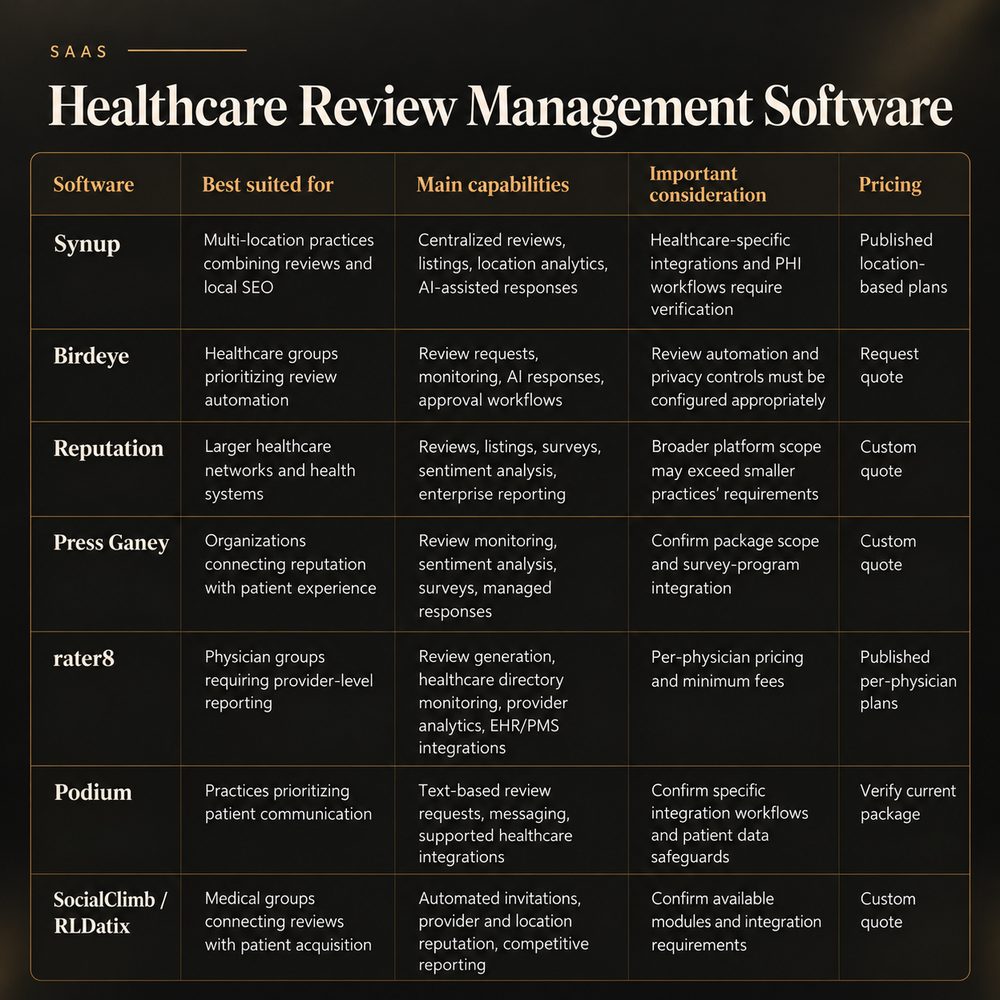
- Synup: Best suited for: multi-location practices combining reviews and local SEO. Main capabilities: centralized reviews, listings, location analytics, AI-assisted responses. Important consideration: healthcare-specific integrations and PHI workflows require verification. Pricing: published location-based plans.
- Birdeye: Best suited for: healthcare groups prioritizing review automation. Main capabilities: review requests, monitoring, AI responses, approval workflows. Important consideration: review automation and privacy controls must be configured appropriately. Pricing: request quote.
- Reputation: Best suited for: larger healthcare networks and health systems. Main capabilities: reviews, listings, surveys, sentiment analysis, enterprise reporting. Important consideration: broader platform scope may exceed smaller practices' requirements. Pricing: custom quote.
- Press Ganey: Best suited for: organizations connecting reputation with patient experience. Main capabilities: review monitoring, sentiment analysis, surveys, managed responses. Important consideration: confirm package scope and survey-program integration. Pricing: custom quote.
- rater8: Best suited for: physician groups requiring provider-level reporting. Main capabilities: review generation, healthcare directory monitoring, provider analytics, EHR/PMS integrations. Important consideration: per-physician pricing and minimum fees. Pricing: published per-physician plans.
- Podium: Best suited for: practices prioritizing patient communication. Main capabilities: text-based review requests, messaging, supported healthcare integrations. Important consideration: confirm specific integration workflows and patient data safeguards. Pricing: verify current package.
- SocialClimb / RLDatix: Best suited for: medical groups connecting reviews with patient acquisition. Main capabilities: automated invitations, provider and location reputation, competitive reporting. Important consideration: confirm available modules and integration requirements. Pricing: custom quote.
How We Evaluated These Healthcare Reputation Management Platforms
This comparison is based on publicly available vendor product information, official documentation, and pricing pages reviewed in October 2026.
The platforms were assessed using seven buyer-relevant criteria:
- Review coverage: Support for Google and healthcare-relevant review platforms.
- Multi-location management: Centralized oversight, reporting, filtering, and staff permissions.
- Review generation: Invitation automation and the ability to configure unbiased review requests.
- Patient privacy: Documented security capabilities, response controls, and safeguards relevant to healthcare.
- Integrations: Available connections to EHR, practice management, and communication systems.
- Analytics: Reporting by location, provider, review source, and feedback category.
- Pricing: Public rates, billing units, minimum commitments, and cost transparency.
The comparison separates documented vendor capabilities from deployment-specific requirements that purchasers must verify.
Vendor documentation establishes what a company advertises, but it does not independently demonstrate implementation quality, product reliability, HIPAA compliance, or business results.
7 Healthcare Review Management Software Platforms to Compare
1. Synup
Best for: Medical and dental groups that want review monitoring, business listings, and location-level marketing reporting in one platform.
Synup provides reputation management and local marketing tools for multi-location businesses and agencies.
Its review management capabilities include a centralized inbox, monitoring across supported review sources, AI-assisted response drafting, sentiment analysis, competitor comparisons, and location-level reporting.
For healthcare organizations, these functions can help marketing teams oversee clinic reviews while maintaining business listings and broader local visibility activities.
Key capabilities
- Unified review inbox covering supported publishers.
- Filtering by review source, rating, location, and response status.
- AI-assisted drafts, templates, and response approval workflows.
- Location-level analytics for review volume, ratings, response rates, and sentiment.
- Competitor review comparisons.
- Business listing management and related local marketing tools.
- Exportable reporting for multiple locations.
Strengths
Synup is particularly relevant when an organization wants reputation management and local listing accuracy connected in one environment.
Its broader platform supports location information management, making it useful for healthcare groups that manage multiple clinic addresses, Google Business Profiles, and regional marketing programs.
The product documentation also describes support for custom review sources. However, custom-source monitoring should not be assumed to provide the same response capabilities as a supported direct integration.
Limitations
Synup is a general local marketing platform rather than a healthcare-exclusive patient experience system.
Organizations requiring EHR-triggered invitations, physician-specific workflows, healthcare directory integrations, or the processing of protected health information should confirm these capabilities individually.
Buyers should also establish which review sources support monitoring, which support direct replies, and how sensitive information is handled.
Pricing
According to Synup's published pricing page, the monthly billing options include:
- Solo: $49 per month for one location.
- Premium: $299 per month for up to 10 locations.
- Pro: $499 per month for up to 25 locations.
- Scale: $899 per month for up to 50 locations.
Enterprise arrangements use custom pricing.
Synup also advertises annual billing discounts. Buyers should confirm the applicable billing interval, included credits, and contractual terms.
Choose Synup if: Your primary requirements are centralized review oversight, business listings, and local marketing visibility across multiple clinics, with healthcare-specific integration and privacy needs assessed separately.
2. Birdeye
Best for: Healthcare organizations seeking review generation, centralized monitoring, AI-assisted responses, and configurable approval processes.
Birdeye provides review management capabilities for organizations operating multiple locations, including healthcare businesses.
Its platform supports review collection, monitoring, alerts, sentiment analysis, response assistance, and workflow automation.
One differentiator is the ability to configure how AI-generated responses are handled.
Birdeye's documentation describes workflows that can suggest replies for manual publication, publish responses automatically, or require human approval before posting.
Key capabilities
- Monitoring across supported review websites.
- Automated review invitation workflows.
- AI-generated response suggestions.
- Configurable response agents and approval workflows.
- Review alerts and task routing.
- Sentiment summaries and multi-location reporting.
- Centralized review management.
Strengths
Birdeye is relevant for organizations that need to reduce the administrative burden of monitoring and responding to reviews across many locations.
Its documented human-approval workflows are particularly useful for healthcare groups that want AI assistance without automatically publishing every generated response.
The platform can also help teams identify feedback that requires escalation rather than a routine public reply.
Limitations
Healthcare organizations should not assume that a configurable AI response system automatically prevents HIPAA violations.
Even a positive review may contain identifying or sensitive information. Reviewers can also include medical details voluntarily, which does not authorize a practice to repeat or confirm those details.
For this reason, organizations should evaluate whether all healthcare review responses require human approval, rather than approving only low-rated reviews.
Buyers should also verify module availability, staff permissions, integration scope, and contractual privacy safeguards.
Pricing
Birdeye uses a sales-led pricing process for relevant multi-location solutions.
Request a quote specifying the number of locations, included modules, response automation, integrations, implementation, and support.
Choose Birdeye if: Your organization prioritizes review automation and centralized workflows while retaining human oversight of sensitive public communications.
3. Reputation
Best for: Hospitals, health systems, and larger healthcare networks that need to connect reviews, listings, patient feedback, and organizational reporting.
Reputation provides a healthcare-focused solution for managing public reputation, local visibility, and patient feedback.
Its healthcare offering combines review management with listings, surveys, sentiment analysis, and reporting across facilities, service lines, and regions.
This broader scope makes it relevant to health systems that want to evaluate reputation trends at multiple organizational levels.
Key capabilities
- Centralized review monitoring and response management.
- Healthcare-oriented business listings and provider information management.
- Reputation scoring and performance dashboards.
- Sentiment analysis across facilities and regions.
- Patient feedback and survey insights.
- Competitive reputation comparisons.
- Enterprise-level reporting.
Strengths
Reputation is useful when leadership needs more than a centralized review inbox.
Its healthcare-oriented reporting supports comparisons across care locations, regions, and service lines.
The platform also connects review management with provider discovery and location visibility, which can help organizations maintain more consistent patient-facing information.
For larger networks, combining these functions may reduce fragmentation between marketing and patient experience reporting.
Limitations
A comprehensive enterprise platform may require more configuration, governance, and implementation planning than a smaller medical group needs.
Buyers should identify which reporting, provider discovery, survey, and competitive analysis modules are included in the proposed package.
Organizations should also determine whether their existing analytics or patient experience platforms already provide some of the same functionality.
Pricing
Healthcare pricing is generally established through a customized sales process.
Request a proposal covering facilities, providers, user permissions, integrations, licensed modules, implementation, and support.
Choose Reputation if: Your healthcare network needs organization-wide reputation analysis alongside listings, provider visibility, and patient feedback reporting.
4. Press Ganey: For Healthcare Patient Experience and Reputation Management
Best for: Hospitals and medical groups that want online reputation management closely connected with structured patient experience programs.
Press Ganey offers reputation management within a broader experience management portfolio.
Its documented capabilities include review monitoring, response workflows, sentiment analysis, listings management, review requesting, review publishing, and managed response services.
This makes it particularly relevant to organizations that already use formal patient experience measurements and want to consider public feedback alongside those programs.
Key capabilities
- Monitoring and management of reviews from supported sources.
- Healthcare-relevant sentiment analysis and reporting.
- Location and organizational reputation insights.
- AI-assisted and template-based response workflows.
- Managed review response services.
- Review requesting and publishing products.
- Connections to broader experience measurement capabilities.
Strengths
Press Ganey is a relevant option for organizations that want public reputation management coordinated with patient experience measurement.
Its broader product portfolio supports a more integrated view of feedback, surveys, service concerns, and organizational reporting.
The availability of managed response services may also be useful for larger organizations that need support maintaining consistent response practices.
Limitations
Buyers should confirm how reputation management interacts with existing survey programs, which features are included in the proposed subscription, and whether managed services have separate costs.
Publishing patient survey comments or testimonials requires particular attention to permissions, privacy, and applicable policies. A survey response should not automatically become a public testimonial simply because the technology supports publication.
Organizations seeking only basic Google review collection may not need the platform's broader capabilities.
Pricing
Request a customized proposal identifying technology licenses, professional services, survey-related components, integrations, and implementation expenses.
Choose Press Ganey if: Your organization views public reputation as part of a broader patient experience measurement and governance program.
5. rater8
Best for: Physician groups and specialty practices prioritizing individual provider reputation, healthcare directory visibility, and EHR/PMS-connected review requests.
rater8 is a healthcare-focused reputation management platform with capabilities for review monitoring, automated review generation, provider reporting, and patient satisfaction measurement.
Its product is designed around medical practices and providers rather than general retail or service businesses.
The company documents connections to EHR and practice management workflows, supporting review requests associated with patient encounters.
Key capabilities
- Automated review invitations following qualifying encounters.
- Monitoring of Google and healthcare-specific review platforms.
- Individual provider and organizational reporting.
- AI-assisted response tools.
- Patient satisfaction surveys and benchmarking.
- Healthcare-oriented onboarding and integration support.
- Healthcare review listings and reputation dashboards.
Strengths
rater8's provider-level emphasis is valuable for medical groups where patients research individual physicians as well as practice locations.
The platform's medical directory coverage, physician-specific reporting, and EHR/PMS integration capabilities distinguish it from general local marketing products.
It also provides comparatively transparent public pricing.
A free monitoring option is listed separately from its paid review generation and reporting plans, allowing buyers to distinguish basic monitoring from more comprehensive functionality.
Limitations
Organizations need to model costs around the number of physicians, not just physical locations.
A medical group with 20 facilities and 150 physicians may therefore have different cost considerations from one purchasing a location-based platform.
Buyers should also verify the exact EHR/PMS integration, invitation distribution rules, provider attribution, and features included in each tier.
Pricing
According to rater8's published pricing page:
- Monitoring: Free for the listed monitoring features.
- raVE Lite: $89 per physician per month.
- raVE Pro: $109 per physician per month.
- raVE Pro+: Contact sales.
The company also identifies a $250 minimum monthly fee and notes that one-time setup fees are not included.
Buyers should confirm billing terms and the total licensed provider count.
Choose rater8 if: Physician-specific reputation management, medical directory coverage, and EHR-connected review collection are primary requirements.
6. Podium: For Review Requests and Patient Communication
Best for: Medical, dental, and aesthetics practices that want review requests connected with broader patient communication workflows.
Podium combines communication and reputation management tools, including messaging, review requests, and automation.
Its integration directory documents connections with healthcare systems including Epic, AdvancedMD, Modernizing Medicine, and eClinicalWorks.
However, the supported functionality and implementation process vary by integration.
For example, Podium's Epic documentation describes an implementation involving Redox and the healthcare organization's technical resources.
Key capabilities
- Automated review invitation workflows.
- Text-based customer and patient communications.
- Review monitoring and response functionality.
- Connections to supported healthcare systems.
- Communication automation and workflow integrations.
- Centralized messaging capabilities.
Strengths
Podium is relevant to practices that want to connect reputation management with patient-facing communication.
Instead of treating review requests as a separate marketing activity, teams may be able to integrate invitations into an approved post-visit communication process.
Its healthcare integration directory gives buyers a starting point for determining which existing systems might support these workflows.
Limitations
Healthcare organizations must confirm what each integration can actually do.
A documented connection does not establish that every scheduling, clinical, or patient communication workflow is supported.
Some integrations require third-party services, vendor approvals, additional configuration, or fees from the connected software provider.
SMS communications also require careful attention to patient preferences, applicable consent and messaging requirements, opt-outs, and PHI handling.
Pricing
Confirm current pricing directly with Podium.
Request a breakdown of licensed locations, message usage, automation capabilities, integrations, implementation costs, and optional services.
Choose Podium if: Patient communication automation and review invitations are closely connected operational priorities.
7. SocialClimb / RLDatix
Best for: Multi-site healthcare groups connecting provider visibility, online reputation, and patient acquisition activities.
The product focuses on healthcare reputation management, automated review invitations, patient feedback monitoring, competitive comparisons, and Google Business Profile oversight.
Its workflows are designed around healthcare providers and practice locations.
Key capabilities
- Automated review invitations associated with patient visits.
- Monitoring of Google, Healthgrades, and other supported sources.
- Provider- and practice-level invitation distribution.
- Competitive intelligence dashboards.
- Google Business Profile management.
- Healthcare-oriented EHR and practice management integration capabilities.
Strengths
SocialClimb is relevant to medical groups that want reputation management connected to patient discovery and acquisition.
Its healthcare-specific positioning can help organizations evaluate reviews at both provider and facility levels.
The product also provides tools for comparing reputation performance against local competitors.
For groups with many physicians across multiple facilities, this distinction between provider and practice reputation can be particularly useful.
Limitations
Buyers should confirm the currently available modules, supported integrations, implementation requirements, and commercial terms under RLDatix.
The company describes broad EHR and practice management compatibility, but organizations should verify support for their exact systems.
Its provider- and location-level invitation workflows should also be configured to request authentic feedback without selectively targeting patients based on expected review sentiment.
Pricing
Request a current proposal from RLDatix identifying licensed modules, facilities, providers, integrations, onboarding, and support services.
Choose SocialClimb / RLDatix if: Your organization wants healthcare-focused provider and location reputation management connected to patient acquisition initiatives.
What Features Should Healthcare Review Management Software Include?
The feature checklist should begin with operational requirements rather than vendor marketing claims.
For healthcare groups managing multiple locations, centralized oversight, privacy controls, and reliable reporting are particularly important.
- Multi-location dashboard: Why it matters: Gives headquarters visibility across clinics. What to verify during a demonstration: Can users filter by region, facility, and provider?
- Review monitoring: Why it matters: Helps prevent supported sources from being overlooked. What to verify during a demonstration: Which platforms support monitoring and direct replies?
- Automated invitations: Why it matters: Reduces manual request work. What to verify during a demonstration: Can invitations be unbiased, location-specific, and controlled?
- Response approvals: Why it matters: Supports safer public communications. What to verify during a demonstration: Can all healthcare replies require trained human review?
- Staff permissions: Why it matters: Restricts unnecessary access. What to verify during a demonstration: Can access be limited to designated clinics?
- EHR/PMS integrations: Why it matters: Supports approved encounter-based workflows. What to verify during a demonstration: Is the exact system and workflow supported?
- Reputation analytics: Why it matters: Reveals location-level performance differences. What to verify during a demonstration: Can reports separate volume, sentiment, rating, and source?
- Escalation workflows: Why it matters: Connects concerns with accountable employees. What to verify during a demonstration: Can sensitive issues be routed through secure channels?
- Audit history: Why it matters: Supports accountability. What to verify during a demonstration: Are edits, approvals, and actions recorded?
- Exportable reports: Why it matters: Supports leadership and compliance reviews. What to verify during a demonstration: Can reports exclude unnecessary identifiable information? A particularly useful evaluation question is:
Can headquarters identify a problem at one clinic without exposing patient information to employees at unrelated locations?
The answer reveals how well a platform balances reporting, privacy, and operational control.
Centralized oversight with local accountability
An effective operating model combines central governance with controlled local participation.
Corporate teams can establish:
- Review solicitation standards.
- Approved public response procedures.
- Staff access policies.
- Escalation rules.
- Reporting definitions.
- Privacy and security requirements.
Authorized location managers can then monitor local reviews and investigate operational concerns within those boundaries.
This reduces inconsistent practices without removing the local context needed to address patient experience issues.
Test real workflows, not only feature checklists
A vendor demonstration should use realistic healthcare scenarios.
For example, ask the vendor to demonstrate what happens when a patient posts a one-star Google review that mentions a diagnosis, names an employee, and alleges a billing error.
The demonstration should show how the platform:
- Identifies the correct clinic.
- Alerts the appropriate employee.
- Restricts access to sensitive internal information.
- Routes the review for human approval.
- Creates a public response without disclosing PHI.
- Supports secure investigation outside the public review platform.
- Records the action for internal accountability.
This exercise is more informative than a generic dashboard presentation because it tests multiple operational requirements together.
HIPAA Considerations for Healthcare Review Management Software
Software marketed to healthcare organizations is not automatically HIPAA compliant for every workflow or deployment.
HIPAA obligations depend on the healthcare organization's status, the vendor's role, the information being handled, and the specific activity involved.
A vendor's security features or compliance claims do not eliminate the healthcare organization's responsibility to evaluate its own use of the system.
When does a healthcare review vendor need a BAA?
A Business Associate Agreement (BAA) is generally required when a vendor performs functions or services involving protected health information (PHI) on behalf of a HIPAA-covered entity and meets the definition of a business associate.
For example, a review platform that receives identifiable patient appointment records to automate invitations may be functioning as a business associate.
Simply purchasing software does not automatically establish that relationship. The actual services and information exchanged must be evaluated.
The U.S. Department of Health and Human Services explains these requirements in its business associate guidance.
Before implementation, healthcare organizations should establish:
- Whether PHI will enter the platform.
- Whether the vendor is acting as a business associate.
- Whether an appropriate BAA must be executed before sharing PHI.
- Which data fields the integration requires.
- Whether subcontractors or subprocessors will handle the information.
- How long data will be retained.
- What happens to the information when the contract ends.
A BAA is not a substitute for evaluating actual security practices.
What security controls should practices assess?
Relevant controls include appropriate encryption, authentication, role-based permissions, audit logging, incident response procedures, and secure transmission.
The HHS HIPAA Security Rule guidance describes administrative, physical, and technical safeguards for electronic PHI.
A procurement security review should examine evidence of applicable controls rather than relying on a general vendor statement.
Healthcare IT and privacy teams should also evaluate how connected AI systems process review text, what data is accessible to them, and whether any information is transmitted to third-party services.
Can healthcare practices respond to negative patient reviews?
Yes, healthcare organizations may respond publicly, but responses must not improperly disclose PHI.
A reviewer voluntarily discussing a diagnosis, appointment, or treatment does not automatically authorize the practice to confirm the person's patient status or repeat medical information.
HHS documented a settlement involving New Vision Dental after inappropriate disclosures of patient information in online review responses.
The case illustrates why privacy safeguards are essential even when staff believe they are correcting an inaccurate public complaint.
Example of an inappropriate response:
We reviewed your appointment record and confirmed that your procedure was completed on Tuesday.
This reveals information about an identifiable person's healthcare relationship.
Example of a safer general response:
Thank you for sharing your feedback. We take concerns seriously and welcome the opportunity to discuss them privately. Please contact our office manager using the contact information on our website.
The second response does not confirm patient status or discuss medical care.
Healthcare organizations should establish approved response standards with their privacy or legal teams before permitting public publication.
For particularly sensitive review content, an automated response should not replace trained human judgment.
Keep public review responses separate from private case management
A public response and an internal complaint investigation serve different purposes.
The public response should acknowledge feedback appropriately without disclosing protected information.
Any investigation involving appointment records, treatment details, or other sensitive information should occur through an authorized internal workflow.
Review management software should support this separation rather than encouraging staff to discuss private patient information in a public review thread.
How Can Healthcare Organizations Automate Patient Review Requests?
Automated review invitations commonly use an approved operational event, such as a completed appointment, to trigger a message.
The objective should be to collect representative feedback from eligible patients, not manufacture favorable ratings.
A practical workflow involves five steps.
Step 1: Select an appropriate trigger
Choose an event supported by the healthcare organization's systems and approved by its privacy and communication policies.
An appointment-completion event may be suitable, depending on the implementation.
Avoid exporting unnecessary clinical details merely to initiate an invitation.
The integration should use only the information needed for the approved workflow.
Step 2: Confirm communication permissions
Review patient contact preferences, applicable consent requirements, messaging rules, and opt-out handling.
Do not assume that permission for an appointment reminder automatically authorizes every type of promotional or feedback-related message.
Healthcare organizations should have their compliance team evaluate the proposed communication.
Step 3: Send a neutral invitation
The message should request honest feedback without suggesting that only positive experiences are welcome.
For example:
We welcome your feedback about your experience. If you would like to share an honest public review, please use this link: [location review link]. Please avoid including private medical information.
The actual message, delivery channel, and permitted audience should be approved for the organization's workflow.
Step 4: Avoid review gating and incentives
Google's review policies prohibit selectively soliciting positive reviews, discouraging negative reviews, and offering incentives in exchange for Google reviews.
For example, a workflow that sends Google review invitations only to patients who previously gave a four- or five-star satisfaction score creates a policy risk.
Google allows businesses to request genuine reviews, but not to manipulate review sentiment.
The FTC's Consumer Reviews and Testimonials Rule addresses certain deceptive practices, including fake reviews, sentiment-conditioned incentives, and specified forms of review suppression.
The FTC rule does not prohibit every incentive for every review under all circumstances. However, Google's own policy prohibits incentives for Google reviews, regardless of whether positive sentiment is required.
Healthcare organizations should comply with both applicable law and the relevant review platform's policies.
Read the FTC Consumer Reviews and Testimonials Rule guidance.
Step 5: Monitor review and operational outcomes
Measure invitation volume, delivery outcomes, review activity, and recurring feedback themes.
Do not judge the campaign solely by increases in average star ratings.
A credible review program should encourage authentic experiences and help the organization understand what needs improvement.
It should not selectively suppress dissatisfied patients' voices.
How Can Healthcare Groups Manage Google Reviews Across Multiple Clinics?
Healthcare organizations should maintain accurate clinic profiles, centralize review monitoring, assign authorized responders, and evaluate results by location.
Google Business Profiles are an important part of healthcare local visibility, but each facility requires accurate information and appropriate management access.
Recommended management workflow
- Inventory profiles: Identify official clinic profiles and relevant individual practitioner profiles.
- Confirm ownership: Ensure appropriate organizational control and authorized access.
- Maintain location details: Keep business names, addresses, phone numbers, operating hours, and website links accurate.
- Connect supported profiles: Add profiles to the selected review management platform using authorized access.
- Establish response procedures: Route reviews to the correct employees and apply appropriate approvals.
- Monitor exceptions: Track access problems, duplicate profiles, unanswered reviews, and inaccurate listings.
- Review performance: Compare locations using consistent definitions and reporting periods.
Google requires businesses to verify their profiles before replying through Google Business Profile.
Its review management documentation explains the process.
Account for different healthcare settings
Not every healthcare location should use the same listing workflow.
A pharmacy may have different hours for general store access, prescription services, and other activities.
A specialty medical group may need to distinguish its facility information from individual practitioner information.
For example, two physicians may operate from the same practice address, but that does not mean the clinic's public profile and every physician's profile should be treated as identical records.
Healthcare marketers should follow Google's eligibility and profile-management rules rather than automatically creating a separate listing for every service or department.
For pharmacy-specific considerations, see the local SEO for pharmacies guide.
How Should Multi-Location Healthcare Groups Measure Review Management Performance?
Healthcare reputation performance should be evaluated using several complementary metrics.
Average star rating alone does not explain review activity, patient experience, or operational improvements.
Core healthcare review management KPIs
- Average star rating: Calculation or definition: Mean rating for the selected review set. What it shows: Overall rating level
- New reviews: Calculation or definition: Reviews received during the reporting period. What it shows: Recent review activity
- Review response rate: Calculation or definition: Reviews responded to ÷ reviews eligible for response. What it shows: Response coverage
- Median response time: Calculation or definition: Median elapsed time before a response. What it shows: Operational responsiveness
- Invitation conversion: Calculation or definition: Attributed public reviews ÷ delivered invitations. What it shows: Measurable invitation effectiveness
- Negative review trend: Calculation or definition: Changes in low-rated reviews over time. What it shows: Potential emerging concerns
- Issue resolution rate: Calculation or definition: Closed issues ÷ issues opened. What it shows: Follow-through on escalated concerns
- Location coverage: Calculation or definition: Locations meeting monitoring requirements ÷ total eligible locations. What it shows: Program adoption and oversight Measurement note: Invitation conversion is reliable only when the platform supports meaningful attribution.
An increase in total reviews should not automatically be credited to a particular invitation campaign.
Similarly, changes in star ratings should not automatically be interpreted as improvements in healthcare quality.
Example: Comparing three clinics
The following figures are illustrative, not measured industry benchmarks.
- New reviews: Clinic A: 75. Clinic B: 28. Clinic C: 64
- Average rating: Clinic A: 4.6. Clinic B: 4.8. Clinic C: 3.9
- Response rate: Clinic A: 92%. Clinic B: 50%. Clinic C: 88%
- Median response time: Clinic A: 1 day. Clinic B: 5 days. Clinic C: 2 days
- Most frequent concern: Clinic A: Scheduling. Clinic B: Limited recent feedback. Clinic C: Waiting time Clinic B has the highest rating but relatively little new review activity and weaker response coverage.
Clinic C has a lower rating and recurring waiting-time complaints.
Instead of asking Clinic C to generate more positive reviews, leadership could investigate appointment scheduling, patient check-in, and staffing during peak periods.
Clinic B may benefit from clearer response ownership and an assessment of whether its eligible patients are receiving neutral feedback invitations consistently.
Avoid misleading clinic comparisons
A specialty clinic with relatively few monthly visits should not automatically be compared with a high-volume urgent care center.
Review volume, patient populations, care settings, and available review platforms can differ substantially.
Organizations should segment their reporting by relevant operating characteristics and interpret small samples cautiously.
Where possible, review trends should be considered alongside other suitable patient experience or operational measures.
Can Healthcare Review Management Software Integrate With EHR and Practice Management Systems?
Yes. Some healthcare review platforms support direct or partner-based integrations with electronic health records (EHRs) and practice management systems (PMS).
However, available functionality depends on the vendor, connected system, implementation method, permissions, and supported workflow.
A vendor's integration directory is a useful starting point, but it should not replace technical validation.
Common integration methods
Native integration: A documented connection supported by the platforms involved.
Partner integration: A connection implemented through an approved third-party service.
API integration: A customized exchange using supported application interfaces.
Scheduled data transfer: A controlled exchange of permitted information used to support an approved workflow.
What should healthcare IT teams verify?
Before approving a connection, ask the vendor to demonstrate the actual workflow using the organization's current systems.
For example, if the organization uses a specific EHR, the vendor should explain:
- Which encounter or appointment event triggers a review invitation.
- What data fields are transmitted.
- Whether unnecessary clinical information can be excluded.
- How patient contact preferences are respected.
- How integration failures and duplicate invitations are handled.
- Which organization controls credentials and access.
- Whether third-party integration services are involved.
- How the connection can be disabled or terminated safely.
The demonstration should also confirm whether location and provider attribution remain accurate when physicians work at multiple facilities.
Important: An EHR integration may be technically possible without being operationally or contractually appropriate for the healthcare organization's intended use.
Privacy, security, and communication requirements must be addressed separately.
How Much Does Healthcare Review Management Software Cost?
Healthcare review management software may be priced per location, physician, account, feature package, usage volume, or enterprise contract.
There is no reliable universal monthly cost because vendors use different pricing models and include different services.
A group with 20 clinics and 150 physicians may receive a substantially different quote from a provider-priced platform than from a location-priced system.
Common pricing models
- Per location: Typical structure: Fee based on clinic or facility count. What buyers should check: Whether provider profiles cost extra
- Per physician: Typical structure: Fee based on licensed clinicians. What buyers should check: Total provider count and minimum fees
- Tiered subscription: Typical structure: Features grouped into packages. What buyers should check: Which automation and analytics functions are included
- Enterprise agreement: Typical structure: Negotiated organizational contract. What buyers should check: Minimum commitments and additional charges
- Usage-based pricing: Typical structure: Fees related to messages or consumption. What buyers should check: Monthly volumes, limits, and overage charges
Published pricing examples
Two platforms in this comparison provide identifiable public rates.
Synup: Published monthly billing starts at $49 for one location, with a $299 plan covering up to 10 locations.
rater8: Published paid plans include $89 and $109 per physician per month, subject to applicable minimums and potential setup costs.
These are not directly equivalent prices.
For example, ten clinics operating with multiple physicians could have different license requirements under the two models.
Public rates should also be checked again before purchasing, since pricing and packaging may change.
For other platforms, request a written commercial proposal rather than relying on unsupported estimates.
Calculate the total cost of ownership
A purchasing decision should account for more than the subscription fee.
Request a detailed cost breakdown covering:
- Software subscriptions and billing frequency.
- Licensed locations, physicians, and users.
- EHR and PMS integrations.
- Implementation and onboarding.
- SMS and email allowances.
- Analytics and reporting modules.
- Managed response services.
- Support and training.
- Contract renewal and termination provisions.
- Data exports and migration requirements.
A useful internal comparison is annual total cost divided by the number of managed locations or providers, using consistent definitions.
However, cost per location should not be the only decision factor.
A basic review monitoring service is not directly equivalent to a healthcare patient experience platform with provider-specific reporting and EHR integrations.
How to Choose the Right Healthcare Reputation Management Platform
The selection process should begin with the organization's operational requirements, not the vendor offering the longest feature list.
A general multi-location marketing platform may be appropriate for a group focused on Google reviews and business listings.
A healthcare-specialized system may be more relevant when physician-level analytics, patient surveys, and EHR-connected review invitations are central requirements.
Match platforms to the primary use case
- Review monitoring with local listing management: Platforms to examine: Synup, Reputation
- Extensive review automation and approval workflows: Platforms to examine: Birdeye
- Enterprise healthcare reputation analytics: Platforms to examine: Reputation
- Reputation management connected to patient experience programs: Platforms to examine: Press Ganey
- Physician-level reviews and healthcare integrations: Platforms to examine: rater8
- Text-based communications and review invitations: Platforms to examine: Podium
- Healthcare provider visibility and patient acquisition workflows: Platforms to examine: SocialClimb / RLDatix These are starting points for evaluation, not exclusive capabilities or performance rankings.
Several products address overlapping requirements.
Use a weighted buyer scorecard
A procurement team can establish evaluation weights before requesting demonstrations.
- Privacy, security, and governance: Suggested weight: 25%
- Multi-location and provider controls: Suggested weight: 20%
- Review collection and monitoring: Suggested weight: 15%
- EHR/PMS integration fit: Suggested weight: 15%
- Reporting and analytics: Suggested weight: 10%
- Implementation and support: Suggested weight: 10%
- Commercial fit: Suggested weight: 5%
- Total: Suggested weight: 100% These weights are illustrative, not an industry standard.
A large health system may place more weight on governance and integrations. A smaller clinic group may prioritize reporting simplicity and cost.
Score vendors from one to five against demonstrated evidence.
For example, a score of five for integration fit should require a demonstration of the proposed workflow, not merely a vendor's statement that an integration is available.
Calculate each weighted score by multiplying the vendor's rating, divided by five, by the criterion's weight.
Document any unresolved requirements before making a decision.
Treat critical requirements as pass-or-fail
Not every requirement should be weighted.
If an intended workflow requires the vendor to process PHI, an appropriate BAA and necessary safeguards should be mandatory conditions.
Likewise, an organization requiring provider-level review attribution should not choose a platform that cannot support that requirement simply because it scores highly on other features.
Questions to ask every vendor
During procurement, require clear answers to the following:
- Which review platforms can you monitor, and which support direct responses?
- Can reporting distinguish physicians, clinics, specialties, and regions?
- Can review invitations be configured to avoid review gating?
- Can all public healthcare responses require human approval?
- What PHI enters the platform, and who can access it?
- Is an appropriate BAA available when required?
- Can you demonstrate the exact EHR/PMS integration we need?
- What does the contract include, and what costs extra?
- What happens to our profiles, reports, and data when the contract ends?
- What implementation and support responsibilities belong to our organization?
These questions help distinguish documented product capabilities from vendor promises that still need validation.
For broader local marketing comparisons, see the business listing management software comparison.
Healthcare Review Management Implementation Checklist
A phased rollout gives organizations an opportunity to identify privacy, integration, and operational problems before deploying the software across every facility.
The following schedule is an illustrative planning framework.
Days 1–15: Audit and governance
- Inventory clinic and provider review profiles.
- Confirm ownership and authorized access.
- Establish baseline ratings, review volume, and response activity.
- Identify relevant review platforms by specialty.
- Establish review solicitation and response policies.
- Complete appropriate vendor privacy and security assessments.
- Define which teams will approve responses and investigate complaints.
At this stage, the organization should document its requirements before configuring automation.
Days 16–30: Pilot configuration
- Select representative clinics with different operating characteristics.
- Connect authorized review profiles.
- Configure staff permissions.
- Establish response approval paths.
- Test approved invitation triggers.
- Verify opt-out handling.
- Confirm location and provider attribution.
- Validate escalation and reporting workflows.
The pilot should include simulated sensitive review scenarios to test how the platform handles patient-related information.
Days 31–45: Controlled rollout
- Expand to additional locations following pilot approval.
- Train authorized local and corporate employees.
- Establish escalation ownership.
- Verify reporting consistency.
- Check integration failures and invitation exceptions.
- Confirm that review requests remain neutral and voluntary.
- Review early operational feedback without assuming causation.
The organization should document exceptions rather than immediately expanding workflows that have unresolved problems.
Days 46–60: Performance review
- Compare results with baseline measurements.
- Investigate recurring patient experience concerns.
- Review outstanding privacy and access issues.
- Adjust response ownership and workflows where needed.
- Finalize leadership reporting.
- Establish recurring quality assurance checks.
- Document onboarding procedures for future locations.
This timeline is not a guaranteed implementation duration.
Larger healthcare networks, complex integrations, and additional compliance reviews may require substantially more time.
Common Healthcare Review Management Mistakes
Several recurring mistakes can reduce the value of healthcare reputation management.
Focusing only on star ratings
A higher average rating does not necessarily demonstrate improved patient experience.
Review volume, sentiment patterns, response activity, and operational outcomes provide additional context.
Automatically publishing AI-generated responses
AI-generated replies can reduce drafting work, but they may also repeat sensitive information supplied in a review.
Healthcare organizations should apply approved response policies and appropriate human review.
Requesting reviews only from satisfied patients
Selective solicitation of positive Google reviews conflicts with Google's review policies.
Feedback requests should be neutral and should not exclude patients solely because they expressed dissatisfaction.
Comparing unrelated clinic types
Different specialties and care settings may receive different volumes and types of feedback.
Organizations should use relevant comparison groups rather than relying entirely on network-wide rankings.
Ignoring physician-level reputation
Patients may research individual practitioners as well as clinic locations.
Multi-site groups should decide whether provider-specific reporting is necessary before choosing a platform.
Buying software without assigning responsibility
A review dashboard cannot resolve an operational complaint unless an authorized employee investigates it.
Ownership and escalation procedures should be established before rollout.
Assuming advertised integrations are included
An integration listed on a vendor's website may require additional licensing, implementation services, or permissions.
Confirm the exact workflow and total implementation cost.
Overlooking third-party access
Review automation may involve the transfer of patient-related information to external systems.
Organizations should evaluate what each vendor and integration partner can access and whether that access is necessary.
The most useful reputation management programs connect patient feedback to accountable operational action rather than treating reviews as a standalone marketing campaign.
Frequently Asked Questions About Healthcare Review Management Software
What is the best healthcare review management software for multi-site practices?
There is no single best platform for every healthcare organization. Synup is relevant for combined review and local listing management; Birdeye emphasizes automation; Reputation and Press Ganey support broader organizational analysis; rater8 specializes in physician-level workflows; Podium focuses on communication; and SocialClimb / RLDatix connects healthcare reviews with provider visibility. The right choice depends on the organization's integration, privacy, reporting, and operational needs.
Is healthcare review management software HIPAA compliant?
HIPAA compliance depends on the organization, vendor relationship, information involved, and configured workflow. Healthcare buyers should assess whether PHI is processed, whether a BAA is required, and whether appropriate privacy and security controls exist. A vendor's general compliance claim is not sufficient evidence that every deployment is compliant.
Can healthcare practices automatically request Google reviews?
Yes. Healthcare practices can use approved workflows to request genuine, voluntary Google reviews. They should not selectively solicit positive reviews, offer incentives for Google reviews, or pressure patients to leave favorable ratings. Applicable privacy, consent, and communication requirements must also be considered.
How should healthcare groups respond to negative Google reviews?
Public responses should remain professional and avoid confirming patient status or disclosing treatment details. Sensitive complaints should be handled through an appropriate private channel by authorized employees. Healthcare teams should use approved response standards and appropriate human oversight.
What is the difference between healthcare review management and healthcare reputation management?
Review management focuses on collecting, monitoring, responding to, and analyzing public reviews. Healthcare reputation management is broader and may include provider profiles, business listings, patient surveys, competitive analysis, reputation reporting, and service recovery.
What should healthcare organizations ask before buying review management software?
Ask which review platforms are supported, whether the system provides provider- and location-level reporting, how public replies are approved, which EHR/PMS integrations are available, whether appropriate contractual safeguards are provided, how information is protected, and what the complete annual cost will be.
Final Verdict
Healthcare review management software should do more than collect ratings.
For multi-site healthcare organizations, the most useful platform is one that provides reliable location-level oversight, appropriate provider reporting, authentic review collection, controlled response workflows, privacy safeguards, and actionable feedback analysis.
Synup, Birdeye, Reputation, Press Ganey, rater8, Podium, and SocialClimb / RLDatix address these requirements from different product perspectives.
Organizations primarily focused on review monitoring and local visibility may prefer a general multi-location marketing platform.
Healthcare groups emphasizing physician reputation, patient experience measurement, or complex EHR integrations may benefit from specialized systems.
The practical buying rule is to choose a platform that can demonstrate your required workflows, support appropriate patient privacy safeguards, and provide reporting that helps authorized teams identify and address problems.
A well-managed reputation program should give healthcare leaders a clearer understanding of patients' experiences and a more consistent process for responding to meaningful feedback.