Local SEO for Pharmacies: Google Profile, Hours and Services by Store
Local SEO for pharmacies: set up a Google Business Profile per store, publish accurate hours and services, and keep multi-store data from drifting.
Asmit Choudhary
Local SEO for pharmacies starts with an accurate Google Business Profile for each eligible store, correct regular and holiday hours, and a clear list of services that each branch actually provides. Match these details on individual store pages, keep accounts under business control, and verify changes publicly. The goal is reliable local discovery, not guaranteed rankings.
A pharmacy chain may have a branch open late while its prescription counter, vaccination clinic, or delivery service follows a different schedule. If every profile inherits the same hours and services, people can arrive when the service they need is unavailable. This guide shows how to avoid those errors and how to measure the results.
Key takeaways
- Every eligible pharmacy storefront needs its own accurate public identity, with company-controlled ownership and a stable store ID.
- Regular store hours, holiday exceptions, and service-specific availability are different data fields. Do not collapse them into one schedule.
- Publish only services verified at that branch, and avoid drug offers or purchase calls to action prohibited by platform policy.
- A Google update is not complete until the public profile and the matching store page show the correct facts.
What does local SEO for pharmacies actually include?
Pharmacy local SEO connects the business information on Google Maps and other discovery platforms with a useful page for each store. The operating work includes claiming eligible profiles, choosing accurate categories, setting hours, mapping services, monitoring reviews, resolving duplicates, and maintaining contact information. Website visibility and profile accuracy should be evaluated separately.
Google explains that local results depend mainly on relevance, distance, and prominence. Complete and accurate information can help the profile match relevant queries, but neither changing hours nor buying a listings tool guarantees a higher Maps position.
How should each pharmacy store set up its Google Business Profile?
Claim and verify the existing profile for each eligible walk-in pharmacy rather than creating a new listing by default. Use the genuine public name, the precise storefront address, the working local phone, a useful store URL, and the most specific appropriate category. Keep the business as owner, then delegate manager access to employees or vendors who need it.
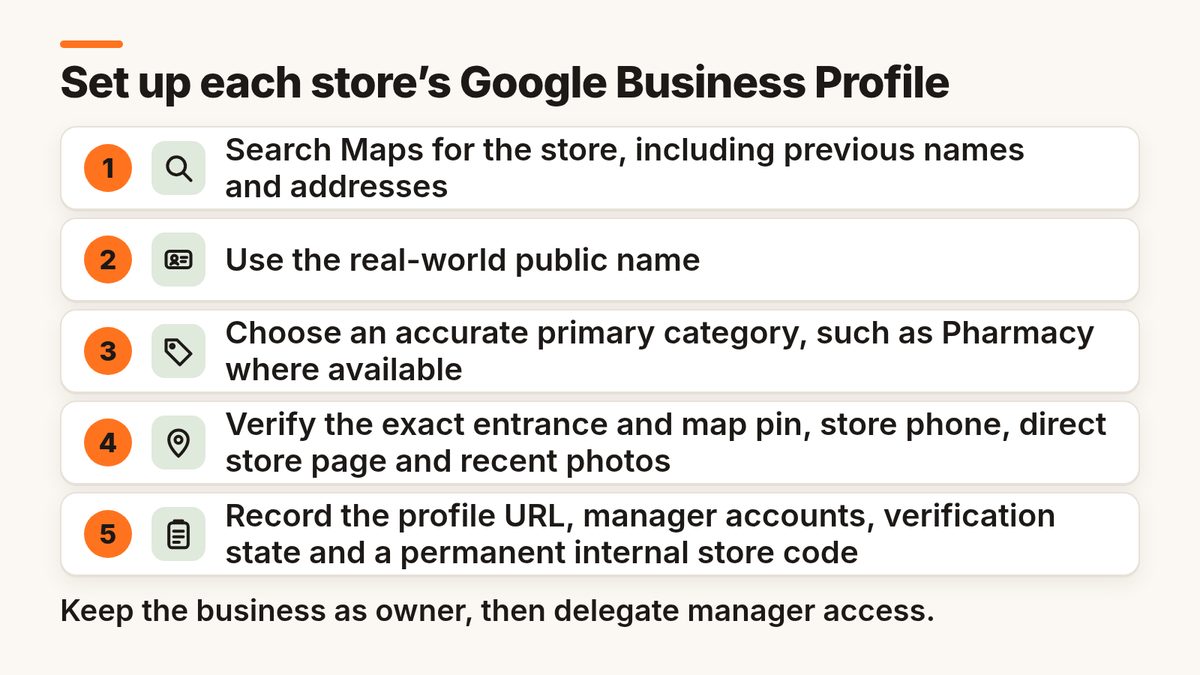
- Search Maps for the store, including previous names and addresses; resolve existing profiles before adding another.
- Use the real-world public name without extra terms such as “24-hour pharmacy” unless that is genuinely part of the name.
- Choose an accurate primary category, such as Pharmacy where available, and only supported additional categories that describe real operations.
- Verify the exact entrance and map pin, the store phone, the direct store page, payment or accessibility attributes where supported, and recent photos.
- Record the Google profile URL, manager accounts, verification state, and a permanent internal store code.
Google’s Business Profile representation guidelines require real-world accuracy and restrict duplicate or ineligible profiles. Do not turn every medicine counter, service, or temporary campaign into a separate business identity.
Which pharmacy hours should be shown by the store?
Publish the hours at which customers can actually access the pharmacy location, then handle different services through supported “More hours” types or clearly worded store-page schedules. Set holiday exceptions separately from weekly hours. If a pharmacy is temporarily closed, use the appropriate status instead of displaying ordinary operating hours that would mislead customers.
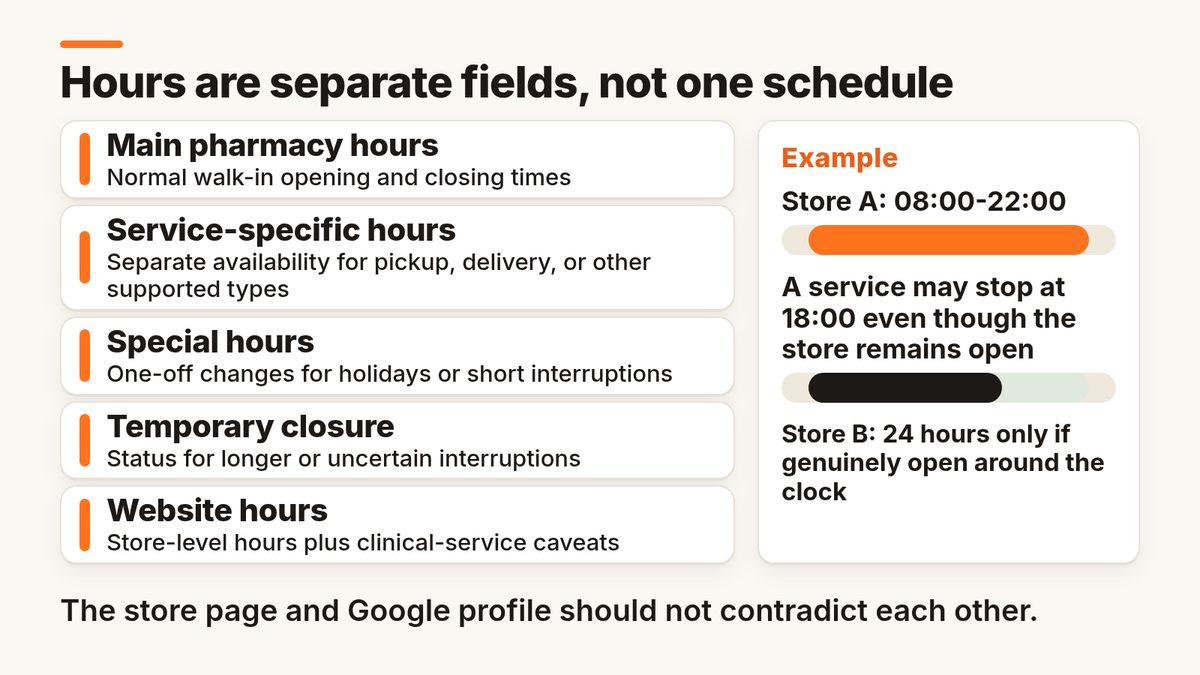
- Main pharmacy hours: What to publish: Normal walk-in opening and closing times. Example or QA rule: Store A: 08:00-22:00; Store B: 24 hours only if genuinely open around the clock
- Service-specific hours: What to publish: Separate availability for pickup, delivery, or other supported types. Example or QA rule: A service may stop at 18:00 even though the store remains open
- Special hours: What to publish: One-off changes for holidays or short interruptions. Example or QA rule: Confirm each holiday for every affected branch; do not assume one national schedule
- Temporary closure: What to publish: Status for longer or uncertain interruptions. Example or QA rule: Review closure length and Google’s status guidance before marking closed
- Website hours: What to publish: Store-level hours plus clinical-service caveats. Example or QA rule: The store page and Google profile should not contradict each other
Google distinguishes regular and special business hours. It also provides More hours for supported service types, and explains how to set special hours. Available controls vary by category and region, so verify what the pharmacy profile actually offers.
What if the store is open 24 hours but a pharmacy service is not?
Do not use a blanket “24-hour services” claim. The location’s main hours should describe actual public access, while the store page should show the separate hours and booking requirements for vaccination, consultation, pickup, or other applicable services. If Google supports a suitable secondary-hours field, use it. Otherwise, explain the distinction clearly on the website and by phone.
How should pharmacies list services without misleading customers?
Describe only verified services offered at that specific branch. A chain-wide service catalogue is a starting point, not proof that every location provides everything. Confirm eligibility, clinical staffing, availability, booking requirements, and any local rules before adding a service to a profile, store page, or promotion. Keep regulated medicines separate from general business information.
- Prescription dispensing: Store-level validation: Current licence, counter availability, contact channel. How to describe it safely: Explain where and when customers can ask about dispensing, without promising stock
- Vaccination or testing: Store-level validation: Offered at this branch, authorized, staffed, appointment rules. How to describe it safely: List only supported clinical services with a truthful booking route
- Pickup / click and collect: Store-level validation: Store participation and pickup window. How to describe it safely: Use the supported profile feature if available; otherwise clarify on the store page
- Home delivery: Store-level validation: Service area, eligibility, delivery schedule. How to describe it safely: Explain availability in neutral terms; avoid blanket medical product promises
- Consultations: Store-level validation: Qualified staff, times, bookings, cost disclosures where required. How to describe it safely: Differentiate the store opening time from consultation hours
Google’s restricted content policy limits promotional posts and content involving regulated pharmaceuticals and other controlled medical goods. Avoid medicine discounts, prescription-drug purchase links, and claims about stock, treatment, or health outcomes that have not been verified and approved. Follow applicable pharmacy-advertising and patient-privacy laws.
Does a pharmacy inside a supermarket or hospital need its own profile?
Sometimes. A genuinely distinct, public-facing pharmacy department may qualify for its own Google Business Profile when it meets Google’s department and eligibility rules. A counter that is merely part of the same store does not automatically qualify. Check separate branding, categories, staffing, access, phone routing, and hours before creating a departmental profile.
For example, a hospital with a public outpatient pharmacy may require a different profile and set of hours from the main hospital, but the clinic, ward, and pharmacy should not all inherit the hospital’s 24-hour schedule. The deciding test is the real-world entity and Google’s eligibility policy, not the number of additional search keywords a team wants to target.
What should every pharmacy location page contain?
Each legitimate pharmacy store should have its own crawlable URL containing the facts customers need for that location. Include the public name, exact address, reliable phone, store hours, separate service schedules where needed, services offered, directions, accessibility details, and a clear way to contact the branch. Avoid near-identical pages with only the city name swapped.
- Use a stable URL for each physical store, such as /stores/city/neighborhood/, and link it from a crawlable store locator.
- Show the real store name, address, contact number, up-to-date hours, and last reviewed date.
- Give unique details: actual access, parking, service availability, pickup windows, and local holiday exceptions.
- Use appropriate LocalBusiness/Pharmacy structured data only where details match visible content; validate before publication.
If a location page is missing from Search, HAKKEN’s guide, Why Are My Location Pages Not Indexed?, explains how to check discovery, crawling, indexability, and canonical selection before rewriting the page. Google also documents LocalBusiness structured data for addresses, hours, and departments. Neither schema nor publishing more pages guarantees indexing.
How can pharmacy chains prevent store-level information drift?
Use one approved location record per store and require changes to move through a simple request, approval, publishing, and verification process. Treat branch managers as the experts on opening hours and local service availability, while a central team controls names, categories, account ownership, and location-page templates. Keep each store’s differences intact rather than enforcing identical values.
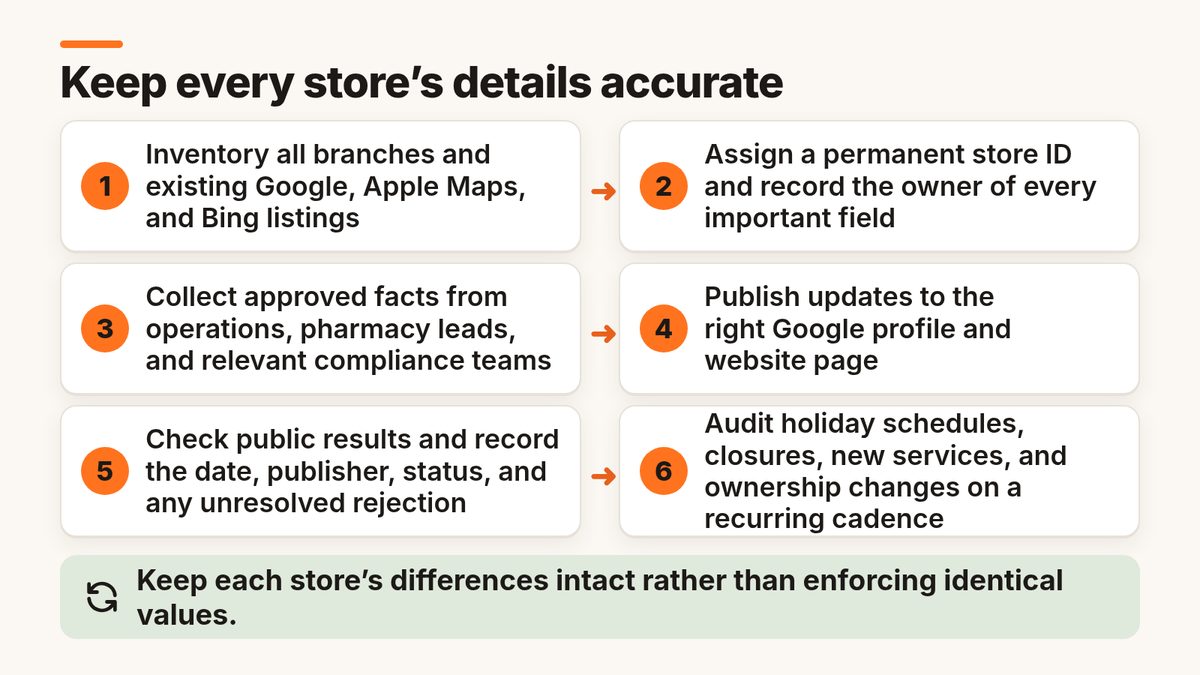
- Inventory all branches and existing Google, Apple Maps, and Bing listings, including old or duplicate profiles.
- Assign a permanent store ID and record the owner of every important field.
- Collect approved facts from operations, pharmacy leads, and relevant compliance teams.
- Publish updates to the right Google profile and website page; use bulk tools only after a controlled preview.
- Check public results and record the date, publisher, status, and any unresolved rejection.
- Audit holiday schedules, closures, new services, and ownership changes on a recurring cadence.
For large portfolios, Google supports bulk profile imports and updates and requires unique store codes. Its bulk verification process has eligibility rules and is not triggered merely by uploading a spreadsheet.
How should pharmacies handle reviews and privacy?
Respond to feedback without confirming whether the reviewer is a patient or discussing prescriptions, conditions, or treatment. A neutral reply can acknowledge the concern and invite the person to contact the store privately. Escalate medication safety, clinical allegations, and sensitive personal information to qualified staff rather than letting an automated reply discuss details in public.
Ask for genuine feedback without incentives or selective filtering. Review policies and patient-data rules vary by market, so standardize a cautious response template, an escalation route, and a review log. Reviews can help customers assess a pharmacy, but a rating alone does not show whether the correct services are currently available.
What should you measure for each pharmacy store?
Track whether people can find, contact, and reach the correct pharmacy. Start with verified public information, not an opaque “visibility score.” Then report Google Business Profile interactions and local website outcomes as separate signals. Segment by branch, service availability, and location status so a recently opened pharmacy is not compared blindly with a mature store.
- Public accuracy: Simple definition: Priority fields confirmed live / fields checked. Operational use: Shows whether people see the right store information
- Hours exceptions: Simple definition: Incorrect or missing holiday/service hours. Operational use: Highlights preventable failed visits
- Contact route health: Simple definition: Working store phone and destination link checks. Operational use: Finds missed calls and wrong landing pages
- Change verification: Simple definition: Changes verified live / updates requiring verification. Operational use: Separates published results from submissions
- Duplicate backlog: Simple definition: Unresolved suspected duplicates by store. Operational use: Shows identity and ownership work remaining
- GBP interactions: Simple definition: Calls, website clicks, directions where available. Operational use: Provides context, not proof of sales or prescriptions
When does pharmacy listings management software help?
A small, stable group of pharmacies can often manage its main profiles with a documented spreadsheet and direct publisher access. Dedicated software becomes useful when there are many stores, multiple service schedules, rapid changes, duplicate cases, or several people approving updates. Test real pharmacy scenarios, not only the advertised number of directories.
Compare support for store-level hours, rejected edits, location categories, regional publishers, access roles, exports, and ownership at contract exit. The need is operational reliability, not an automatic SEO boost.
Hakken’s Local Listings Management Software: Best Tools for 2026 compares approaches to publisher coverage, bulk changes, monitoring, and costs. Treat the options as a shortlist to test, not as a pharmacy-specific endorsement.
A practical 30-day pharmacy local SEO plan
A useful first month fixes wrong store information before attempting a large-scale optimisation campaign. Inventory the locations, confirm eligibility and ownership, publish approved facts, and measure what is visible. Start with a small representative sample, including a late-opening store and a store with special service hours.
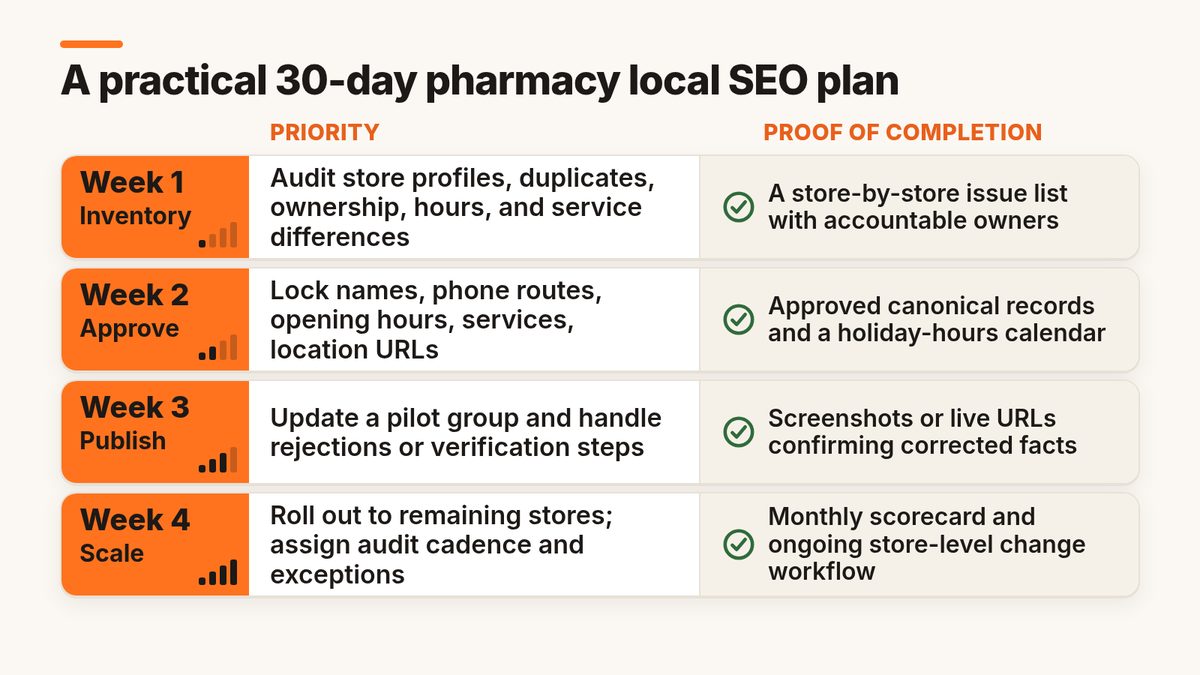
- 1: Inventory: Priority: Audit store profiles, duplicates, ownership, hours, and service differences. Proof of completion: A store-by-store issue list with accountable owners
- 2: Approve: Priority: Lock names, phone routes, opening hours, services, location URLs. Proof of completion: Approved canonical records and a holiday-hours calendar
- 3: Publish: Priority: Update a pilot group and handle rejections or verification steps. Proof of completion: Screenshots or live URLs confirming corrected facts
- 4: Scale: Priority: Roll out to remaining stores; assign audit cadence and exceptions. Proof of completion: Monthly scorecard and ongoing store-level change workflow
Frequently asked questions
How do I get my pharmacy to appear on Google Maps?
Search for an existing Business Profile, claim it through an authorized business account, and complete the verification process Google offers. Then check the name, category, address, phone, hours, website, and eligible services. Visibility is not immediate or guaranteed, but an accurate and verified profile is the right foundation for local discovery.
Can different pharmacy branches have different Google hours?
Yes. Each eligible branch can publish its actual opening hours. Use special hours for holidays or brief changes, and support More hours features for service-specific availability. Keep the hours on each store page aligned with the public profile, and do not mark a store open around the clock unless customers can actually access it.
Should every pharmacy service have its own Google Business Profile?
No. A pharmacy can describe legitimate services without creating another business listing for each one. Separate profiles are appropriate only when a real department or entity qualifies under Google’s eligibility rules. Check distinct public-facing operations and category requirements before creating a second profile at the same address.
Can a pharmacy advertise prescription medicines through Google Business Profile posts?
Do not assume it can. Google restricts promotional content and purchase calls to action for regulated pharmaceuticals, and applicable laws may impose further limits. Pharmacies can still keep factual store details accurate. Have the responsible compliance team review any post involving medicines, medical devices, clinical services, availability, or offers before publication.
Does local SEO guarantee more prescriptions or higher Google Maps rankings?
No. Accurate profiles and pages reduce customer friction and can help Google understand the business, but local results also depend on relevance, distance, prominence, and other factors. Track calls, directions, website interactions, and operational accuracy without attributing every prescription or patient decision to a listing edit.
The bottom line
For pharmacy SEO, the highest-value work is simple to describe and demanding to maintain: one accurate identity per eligible store, hours that reflect actual access, services that the branch truly provides, and a location page that supports the same facts. Verify updates live, protect patient information, and expand only after the core records are dependable.